

Many e-commerce sellers struggle to create professional product photos at scale, especially when launching multiple SKUs, color variations, or seasonal collections.
AI virtual try-on helps e-commerce sellers transform flat-lay clothing photos into realistic on-model images without traditional photoshoots. Instead of hiring models, booking studios, and repeating costly shoots for every SKU, you can now generate professional product visuals in minutes.
This is especially useful for Shopify stores, fashion DTC brands, and marketplaces where product images directly affect conversion rates. Studies show that high-quality product images can significantly increase purchase intent, with 76% of shoppers saying on-model photos are the most useful format for buying decisions.
In this guide, you’ll learn how to use AI virtual try on step by step for e-commerce, from preparing your flat-lay images to generating ready-to-use model photos for product listings.
Why Use AI Virtual Try-On for E-Commerce Listings
Traditional fashion photography is often expensive and time-consuming, especially when you need multiple models, poses, or color variations. For many e-commerce sellers, repeated studio shoots can quickly become one of the biggest content production costs.
AI virtual try-on helps solve three core challenges:
1. Reduce product photography costs
Instead of organizing repeated photoshoots, AI virtual try-on allows you to generate multiple on-model images from a single flat-lay photo. For brands with frequent new arrivals or multiple colorways, this can significantly lower production costs. According to recent e-commerce workflow benchmarks, brands using AI try-on have reduced per-SKU visual costs from $75–$300 for traditional studio shoots to as little as $1–$8 per image, making it a much more scalable solution for fast-moving catalogs.
2. Improve conversion with on-model visuals
Customers are more likely to understand fit, drape, and styling when they see clothing on a model rather than as a flat lay. This helps shoppers visualize how the product might look in real life and often leads to stronger purchase confidence and better conversion performance.
3. Scale SKU production faster
For stores managing large catalogs, AI virtual try-on makes it easier to generate consistent visuals across color variants, sizes, and seasonal collections. This is especially useful for fast fashion and dropshipping brands where speed matters.
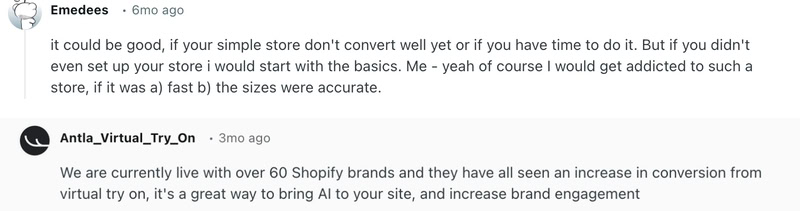
Many sellers on Reddit also mention using AI for secondary SKUs and color variants, while keeping hero products in traditional shoots—a practical workflow that saves both time and budget.
What You Need Before You Start
Before using AI virtual try-on, it’s important to prepare a clean and high-quality input image, as the final result largely depends on the quality of your flat-lay photo.
Here’s a quick checklist before you begin:
- A clean flat-lay image with the clothing fully visible and centered;
- A plain white or neutral background to help the AI detect garment edges more accurately;
- Even lighting with minimal shadows or wrinkles;
- Recommended file formats: JPG, or PNG;
- Suggested resolution: at least 1200px wide, ideally 2000px+ for better detail.
A well-prepared input image helps improve garment edge detection, fabric texture retention, and the overall realism of the final try-on result.
Step 1: Prepare Your Flat-Lay Image
The first step is creating a clean flat-lay image of your product. This can be done either manually or using AI fashion design tools.
How to shoot a clean flat lay at home
If you are doing it manually:
- Use natural lighting near a window;
- Lay clothing on a plain surface;
- Smooth out wrinkles carefully;
- Center the garment in frame.
Common mistakes to avoid
These mistakes often lead to distorted AI try-on outputs:
- Harsh shadows that distort fabric texture;
- Folded sleeves or twisted hems;
- Cropped edges of clothing;
- Low-resolution smartphone images.
Alternative: generate flat lays with AI
If you don’t already have a clean flat-lay image, you can quickly create one using an AI flat lay generator.
With tools like Fashion Diffusion, you only need to upload your original product photo and select the garment area. The system will automatically generate a clean, centered flat-lay image that meets e-commerce clothing photography requirements—no manual shooting or editing needed.
This is especially helpful for early-stage sellers, dropshipping stores, or anyone working with inconsistent supplier images.
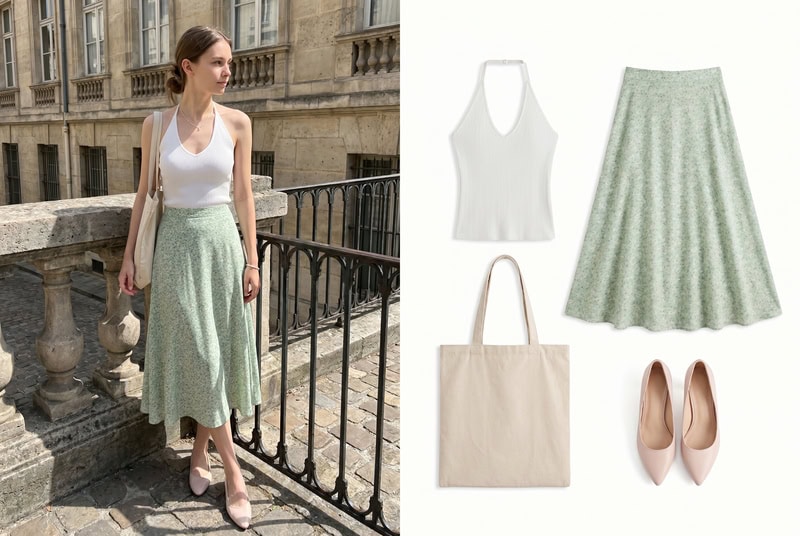
You can see a before-and-after comparison below.
Step 2: Upload and Select Your AI Model
Once your flat-lay image is ready, the next step is selecting a model.
Choose the right body type and pose
When selecting a model for your try-on image, focus on how well the model aligns with your product and target audience.
Here are a few key factors to consider:
- Body type: Choose a model that reflects how your target customers might wear the product;
- Pose: A simple, front-facing pose works best for clarity;
- Framing: Make sure the garment remains clearly visible without distortion.
The goal is to present your product in a way that feels natural, consistent, and easy for customers to understand at a glance.
Match your brand aesthetic
Different fashion brands require different visual tones:
- Minimal fashion → clean studio models;
- Streetwear → casual, dynamic poses;
- Luxury fashion → neutral expressions with soft lighting.
Keeping a consistent visual direction helps your store feel more cohesive and professional.
Best practice for Shopify stores
For Shopify photography and DTC brands, consistent model selection plays a key role in building trust and recognition across product pages. Using a unified model style can make your catalog feel more polished and easier to browse.
Many stores already rely on consistent AI model images for Shopify to maintain a clean and scalable visual system across hundreds of SKUs.
Step 3: Generate and Preview Results
Once everything is set up, you can generate your AI try-on images in just a few seconds.
With AI virtual try-on, you can quickly visualize how various items look on a model without additional photoshoots.
Below are a few examples of what you can create.
Wedding Dress Try-On
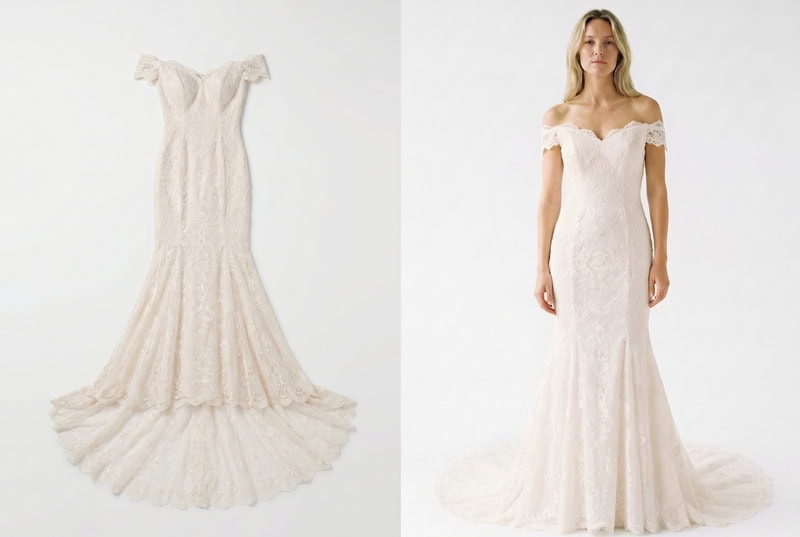
AI virtual try-on works especially well for garments where fit and silhouette matter. For example, wedding dresses can be visualized on a model to better showcase structure, layering, and overall styling—something flat-lay images struggle to convey.
This also makes it easier for customers to try on clothes online free and get a more realistic sense of how the piece might look when worn.
Jewelry Try-On
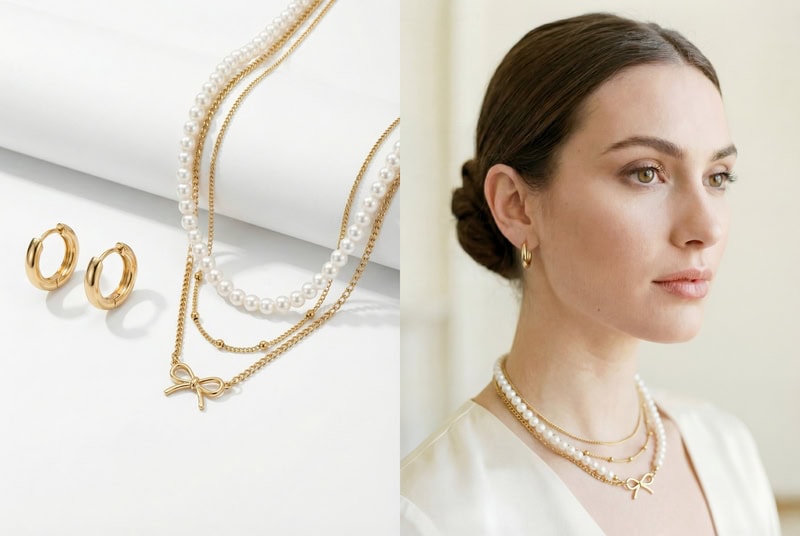
For smaller items like jewelry, AI virtual try-on jewelry helps place products naturally on the model, making it easier to present scale and wearing context.
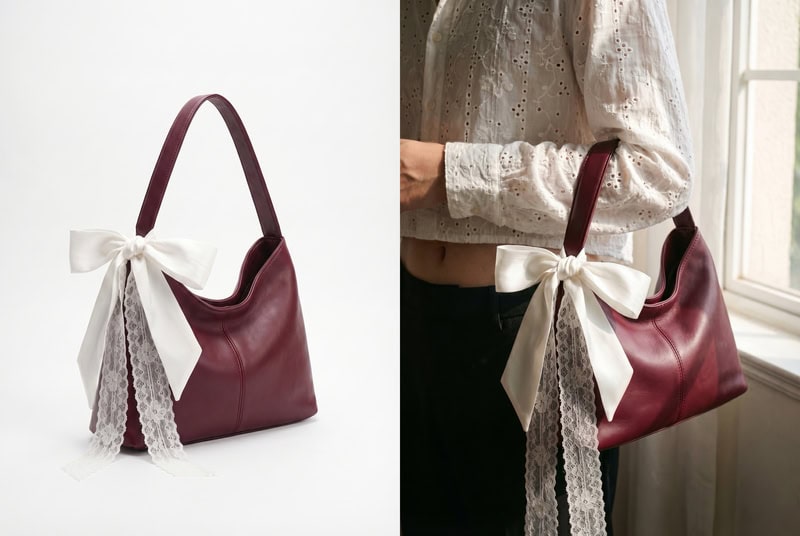
Bags Try-On
With AI virtual try-on bag, Bags can be positioned on the shoulder or held in hand, helping customers understand size, proportion, and styling in a real-world context.
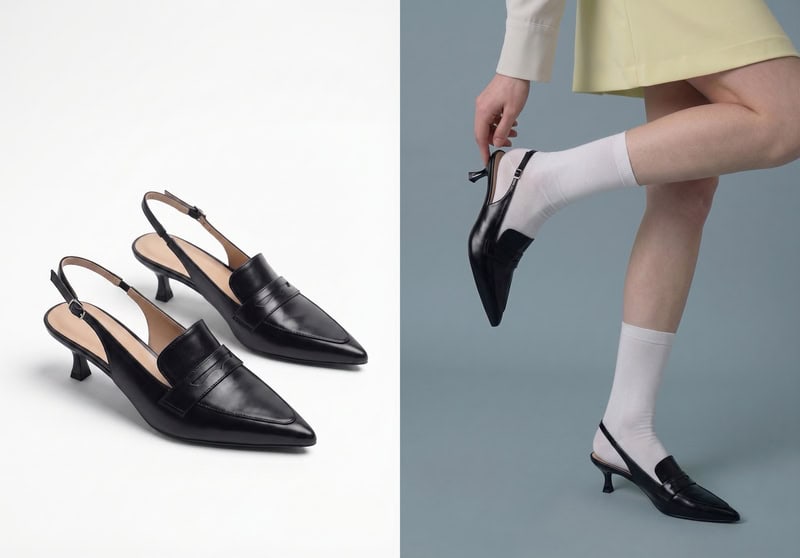
Shoes Try-On
For footwear, AI try-on for product listings allows you to present shoes directly on a model, which is especially useful for showcasing fit, styling, and outfit pairing.
Optimizing Your Listing with the Generated Image
Generating AI try-on images is only part of the process—how you use them on your product page can directly impact conversion.
Image placement on product page
Where you place your images matters just as much as the images themselves.
A common and effective structure is:
- First image: clean product shot (or minimal background);
- Second image: AI virtual try-on (on-model view);
- Additional images: detail shots, close-ups, or lifestyle variations.
This helps customers first understand the product clearly, then visualize how it looks when worn.
For fashion items in particular, placing the try-on image early in the gallery can improve engagement and reduce uncertainty around fit.
A/B testing suggestions
Different image styles can perform very differently depending on your audience and product category.
You can test variations such as:
- Model vs no-model images;
- Studio background vs lifestyle background;
- Static pose vs more dynamic pose.
Even small changes in the first or second image can influence click-through rate and conversion performance.
If possible, test one variable at a time and track metrics like:
- Product page conversion rate;
- Time on page;
- Add-to-cart rate.
Over time, this helps you identify which visual style works best for your store.
Create Scalable Product Images with AI Virtual Try-On
AI virtual try-on is changing how e-commerce sellers create product visuals. Instead of relying on repeated photoshoots, you can turn simple flat-lay images into consistent, on-model product photos in minutes.
From preparing your input image to selecting the right model and optimizing your product listing, each step helps improve how your products are presented and how customers respond to them.
For growing stores, this means:
- Faster content production;
- More consistent visual branding;
- The ability to scale across multiple SKUs without increasing costs.
Tools like Fashion Diffusion make this process even more accessible by combining flat-lay generation, virtual try-on, and high-resolution output in a single workflow—so you can move from product idea to ready-to-publish images without complex production steps.
If you’re working with limited resources or frequently updating your catalog, this kind of workflow can significantly simplify how you create and manage product visuals.
Try AI virtual try-on with Fashion Diffusion to generate realistic model images for your product listings!
FAQ
Yes. AI-generated try-on images can be used on Shopify as long as they accurately represent the product. Many sellers use them alongside standard product photos to improve visual clarity and consistency across listings.
Yes. AI virtual try-on tools are specifically designed to transform flat-lay clothing images into realistic on-model visuals by detecting garment structure and mapping it onto a model.
It depends on your needs. AI is faster, more scalable, and cost-effective, while traditional photography offers more creative control. Many brands use a hybrid approach—professional shoots for hero products and AI for the rest.
Yes. AI virtual try-on makes it easy to generate consistent images across different colorways without reshooting each variant, which is especially useful for stores with large inventories.
They can improve trust when used correctly. As long as the images accurately reflect the product’s fit, color, and details, they help customers better understand what they are buying. Pairing AI images with clear product descriptions and detail shots can further increase confidence.


