

Jewelry is one of the hardest product categories to shop online. A necklace in a product photo tells you almost nothing about how it will actually sit on your neckline. Earrings that look delicate in isolation can overwhelm a face — or disappear entirely. A bracelet that reads as bold on a model’s wrist can look understated on a different one.
Virtual jewelry try-on changes what’s possible before you buy. Upload any jewelry image alongside a photo, and the AI generates a realistic preview showing how the piece actually looks when worn.
This guide covers everything: how the technology works, how to get the best results from each jewelry type, and how to use virtual try-on to make faster, more confident decisions whether you’re shopping or sourcing.
What Is Virtual Jewelry Try-On
Virtual jewelry try-on uses AI to place a jewelry image onto a photo of a person, generating a realistic preview of how that piece looks when worn. You upload two inputs — a jewelry product image and a person photo — and the AI renders the piece at accurate scale, correctly positioned for the jewelry type: at the neckline for necklaces, at the earlobe for earrings, at the wrist for bracelets.
The output isn’t a sticker overlay. The jewelry is rendered with proportional accuracy relative to the body, with lighting consistent with the source photo. Metal finish, gemstone detail, and chain structure all carry over from the product image.
How Does AI Jewelry Try-On Work
The AI reads two things: the jewelry’s physical characteristics from the product image, and the relevant body landmarks from the person photo. It then renders the piece at accurate scale with natural positioning — at the neckline for necklaces, at the earlobe for earrings, at the wrist for bracelets. The result reflects the specific proportions in your photo, not a generic model’s. That’s the difference between seeing whether a piece looks good, and seeing whether it looks good on you.
How to Try On Jewelry Online with AI
Now that you know what the technology does, here’s how to actually use it. The process is straightforward — two inputs, one result, ready in seconds. Fashion Diffusion’s virtual jewelry try-on handles necklaces, earrings, bracelets, and rings, all in the browser with no software to install.
Step 1: Find and upload your jewelry image
Start with a clean product photo — a packshot on a plain background, a brand site image, or a screenshot from anywhere online. The clearer the image, the more accurately the AI reads the jewelry’s details. Fashion Diffusion accepts PNG, JPG, JPEG, and WebP files up to 10MB.
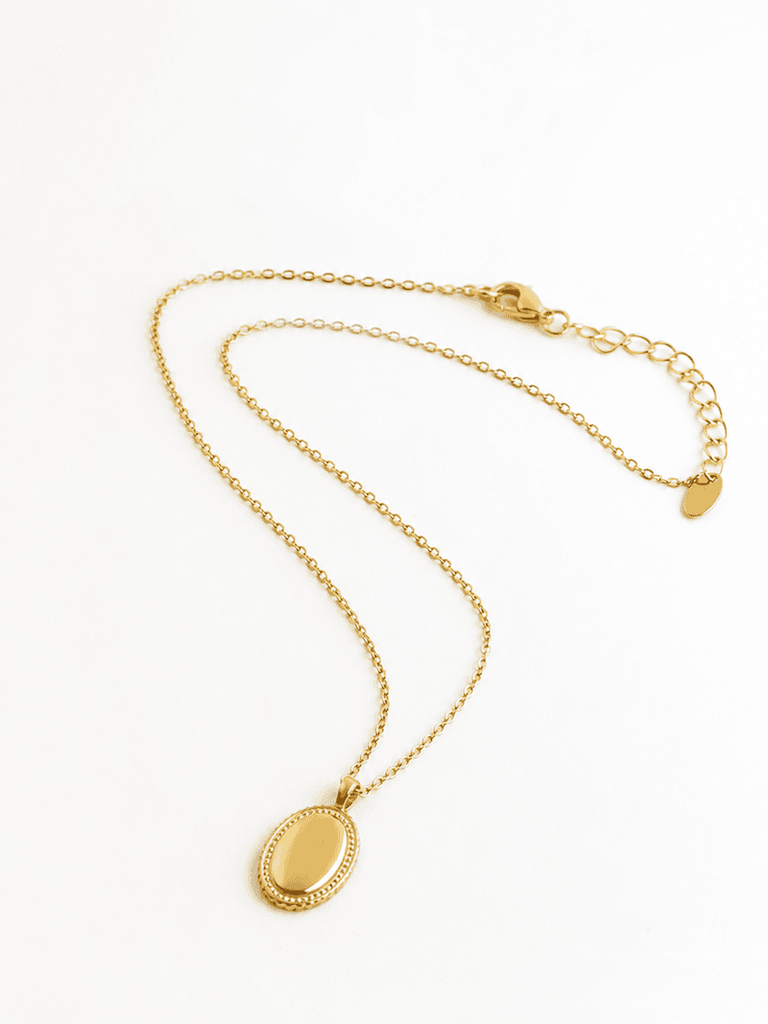
Step 2: Upload your model or personal photo
Upload a photo of yourself or a model. For necklaces, use a photo that shows the neckline clearly — a slight neckline exposure works better than a high collar. For earrings, use a face-forward photo with ears visible and hair pulled back or to one side. For bracelets, use a photo with the wrist clearly visible, ideally in a neutral, relaxed position.

Step 3: Generate and compare
The AI processes both images and generates the result in seconds. The jewelry appears at accurate scale, correctly positioned, consistent with the lighting in the person photo. For the most useful session, run the same person photo with multiple jewelry images — chain lengths, pendant sizes, earring styles, bracelet widths. Because the person is consistent across all comparisons, what you are evaluating is genuinely the jewelry, not lighting or model differences.
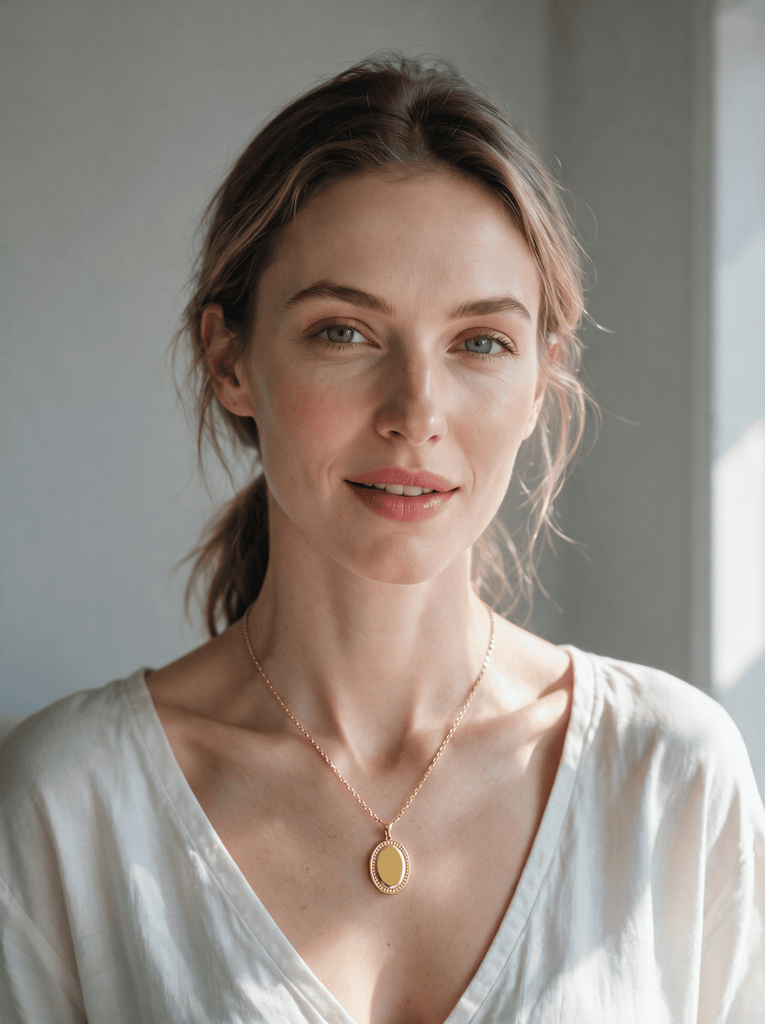
How to Get Better AI Jewelry Try-On Results
The quality of the output depends on the quality of the inputs. These four adjustments make the most consistent difference.
- Use even, diffused lighting. Harsh shadows make it harder for the AI to place jewelry accurately. Natural window light works best.
- Match the photo to the jewelry type. Face-forward for earrings, neckline visible for necklaces, wrist in frame for bracelets.
- Use clean product images. Plain-background product shots give the AI the most to work with. Avoid heavily styled or cluttered images.
- Compare on the same photo. Run three or four pieces against one person photo — the consistent background makes the differences genuinely comparable.
Try On Different Jewelry Styles with AI
Each jewelry type has its own visual logic — what makes a necklace work on one person doesn’t apply to earrings, and bracelets have different proportion relationships altogether. Here’s what to look for when you try on each type.
If you are shopping for rings specifically, we have a dedicated guide to virtual engagement ring try-on that covers the ring-buying process in depth.
Necklaces
Of the three jewelry types, necklaces have the most direct relationship with outfit. The same chain looks completely different depending on what neckline it’s worn with — a long pendant disappears under a crew-neck, and a choker that reads as elegant with a V-neck can feel tight with a collared shirt. Drop length is the variable that changes everything: a choker creates a high, defined horizontal line; a princess length (around 18 inches) sits just below the collarbone; an opera or rope length falls dramatically lower and reads as maximalist or layered.
What to check in the try-on:
- Where the pendant or chain falls relative to the outfit neckline — this is the single most useful thing the try-on reveals that a product photo can’t.
- Whether the chain weight reads as proportional to the face and frame, or disappears against it.
- How the metal color interacts with the skin tone in the photo — warm gold reads very differently against cool or warm skin undertones.
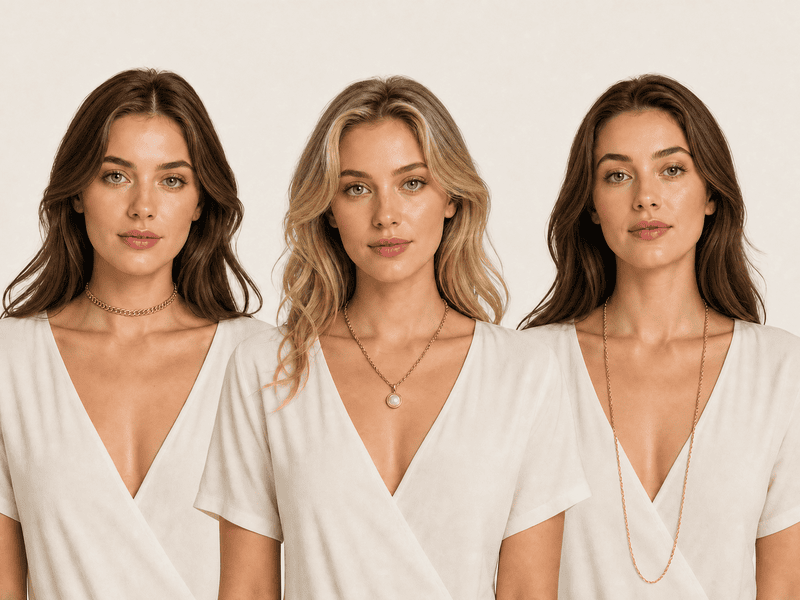
Try on necklace online AI tools like Fashion Diffusion accept any saved product image from a brand site or Pinterest save. The AI places it at accurate drop length based on the person photo.
Earrings
Earrings are the only jewelry type that frames the face directly — which makes them uniquely hard to evaluate without trying them on. A product image shows you the earring in isolation. What it doesn’t show is whether that earring makes your face look longer, wider, more balanced, or more crowded. A drop earring that photographs as delicate can visually shorten a round face. A bold hoop that reads as confident on one face shape can read as overwhelming on a narrower one.
What to check in the try-on:
- Whether the earring extends below the jawline — length below the jaw elongates, length above it adds width, and the difference is only visible when you see it on an actual face.
- How the earring width relates to the face width — wider than the cheekbone reads as statement; narrower reads as accent.
- Whether the hair interferes — the same earring reads completely differently with hair up versus hair framing the face; try-on with the hairstyle you’d actually wear.
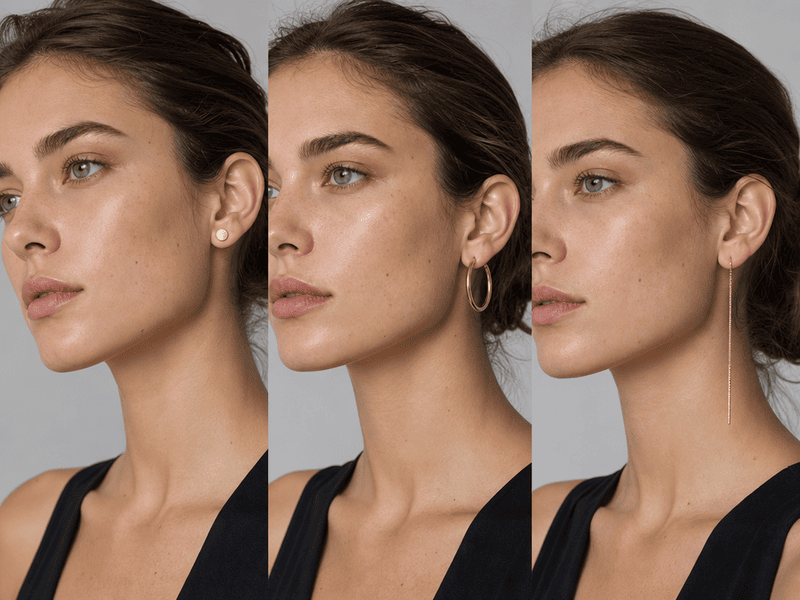
Try on earrings online AI — use a face-forward photo with visible ears. Pull hair back or to one side to get the most useful result. The AI positions the earring at the earlobe with accurate scale.
Bracelets
Bracelets have a dynamic quality that necklaces and earrings don’t — they move with the wrist, and they’re often worn in stacks. That makes proportion and combination the two things most worth evaluating before buying. A wide cuff that reads as sculptural on a wider wrist can look costume-heavy on a narrower one. A delicate chain that reads as understated can almost disappear. And with stacking, the visual weight compounds quickly — two or three bracelets that look good individually can read as cluttered together, or can look perfectly considered.
What to check in the try-on:
- Whether the width reads as proportional to the wrist — this is harder to judge than it sounds, and the try-on makes it immediate.
- For stacking: whether the combination feels intentional — layering different textures, metals, and widths is harder to visualize than a single piece.
- The gap between the bracelet and the wrist edge — a bracelet that fits loosely reads differently from one that sits closer; the try-on shows how much visual presence the piece has at rest.
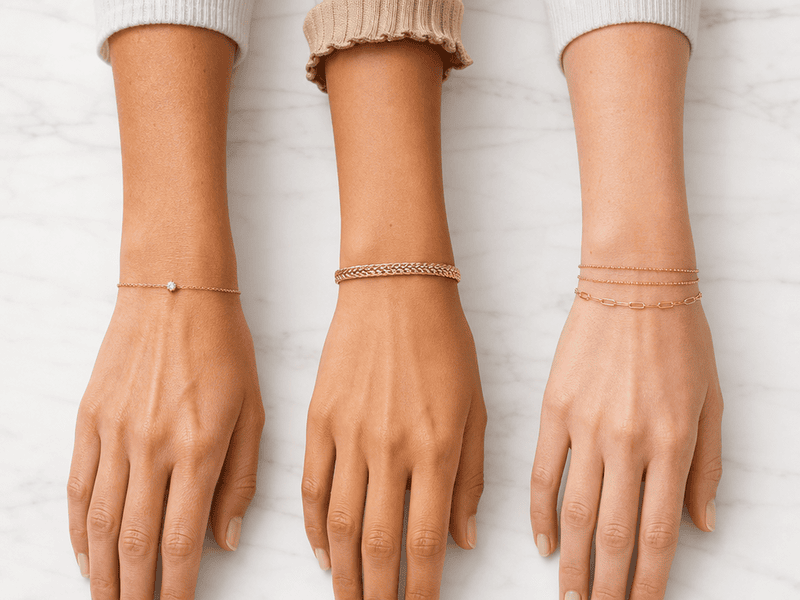
Try on bracelet online AI tools work best with a wrist photo in a relaxed, neutral position. The AI places the bracelet at accurate width and position based on the wrist in the photo.
AI Jewelry Try-On for Shoppers and Jewelry Brands
The same tool serves two different workflows depending on who’s using it.
For shoppers, virtual jewelry try-on answers the questions product pages can’t. Does this necklace length work with how I dress? Do these earrings suit my face? Is this bracelet too wide for my wrist? Seeing the answer before purchasing reduces uncertainty and the returns that come from it.
For jewelry brands and e-commerce sellers, the tool generates on-model product visuals. No photoshoot needed. Upload a product image, choose or upload a model photo, and the AI produces a realistic on-model image ready for product pages, social content, or campaign materials. The same piece can appear on multiple models with different skin tones and proportions, without booking additional sessions.
Try On Any Jewelry with Fashion Diffusion
Knowing how a piece looks in a product photo and knowing how it looks on you are two different things. Fashion Diffusion‘s virtual jewelry try-on puts any necklace, earring, or bracelet on your photo in seconds — upload a product image from any source, add a person photo, and see the result before you decide.
New accounts start with free credits. Try the first piece and see whether the result changes how you shop for jewelry.
FAQ
A tool that places a jewelry product image onto a person photo using AI, generating a realistic preview of how the piece looks when worn. It shows accurate scale, natural positioning, and realistic rendering of metal finish and gemstone detail.
Yes. Fashion Diffusion’s virtual jewelry try-on supports necklaces, earrings, bracelets, rings, and layered combinations. The AI positions each jewelry type correctly based on the person photo — at the neckline, earlobe, or wrist as appropriate.
A well-lit photo where the relevant body area is clearly visible. For necklaces, a photo showing the neckline. For earrings, a face-forward photo with ears visible. For bracelets, a wrist photo in a relaxed position. Even, diffused lighting produces the most accurate AI rendering.
Yes. Brands and e-commerce sellers use Fashion Diffusion’s virtual jewelry try-on to create on-model product images without a photoshoot — placing pieces on AI models or uploaded photos to generate catalog and campaign visuals at scale.
Yes. New Fashion Diffusion accounts start with free credits that can be used on the virtual jewelry try-on tool.


