

Creating product videos with real creators takes time. You need to arrange shoots, prepare products, coordinate filming and go through multiple rounds of editing. For brands with large product catalogs, producing enough content for social media can quickly become expensive.
AI offers another way to create this kind of content. Instead of filming every product from scratch, you can start with product photos, describe the scenes and actions you want, and generate short videos in a UGC style.
With Fashion Diffusion’s AI Video Generator, you can turn multiple product images into a promotional video guided by a visual shot plan. Its customizable video brief lets you define the style, setting, product interactions and dialogue before generating the video.
What Is an AI UGC Video
An AI UGC video is an AI-generated video designed to resemble user-generated content. It often features casual camera angles, everyday settings, natural product interactions and conversational dialogue.
Unlike traditional product commercials, which tend to use polished lighting and carefully staged scenes, UGC-style videos feel more personal and less scripted. Brands use this format for product demonstrations, social media content and advertising on platforms like TikTok, Instagram Reels and YouTube Shorts.
AI makes it possible to create this style of content from existing product images, without arranging a traditional filming session for every video.
What Makes an AI UGC Video Feel Natural
A convincing UGC-style video is not just about adding a handheld camera effect. The setting, product interactions and dialogue all need to feel consistent with everyday content.
Everyday Settings and Natural Lighting
Choose locations that make sense for the product. A handbag might appear in a café or apartment, while skincare products fit naturally into a bathroom or morning routine. Soft daylight and familiar surroundings help create a more casual look than a studio setup.
Realistic Product Interactions
Show how someone would actually use or wear the product. Picking up a bag, putting on a jacket or applying skincare gives viewers a better sense of the product than simply showing it from different angles. Keep the actions simple and clearly connected to the product. Too many movements or complicated transitions can make a short clip feel unnatural.
Conversational Dialogue
UGC-style dialogue should sound like something a person would say in everyday life. For example, “I didn’t expect this bag to fit my laptop” feels more personal than “Introducing our premium leather tote.” Short sentences, specific observations and a relaxed tone work better than formal advertising language.
How to Make an AI UGC Video in Four Steps
Fashion Diffusion’s Product Promo Video lets you build a video from product images using a customizable video brief and visual shot plan. Follow these four steps to turn your product photos into a short promotional video.
Step 1. Prepare and Upload Your Product Images
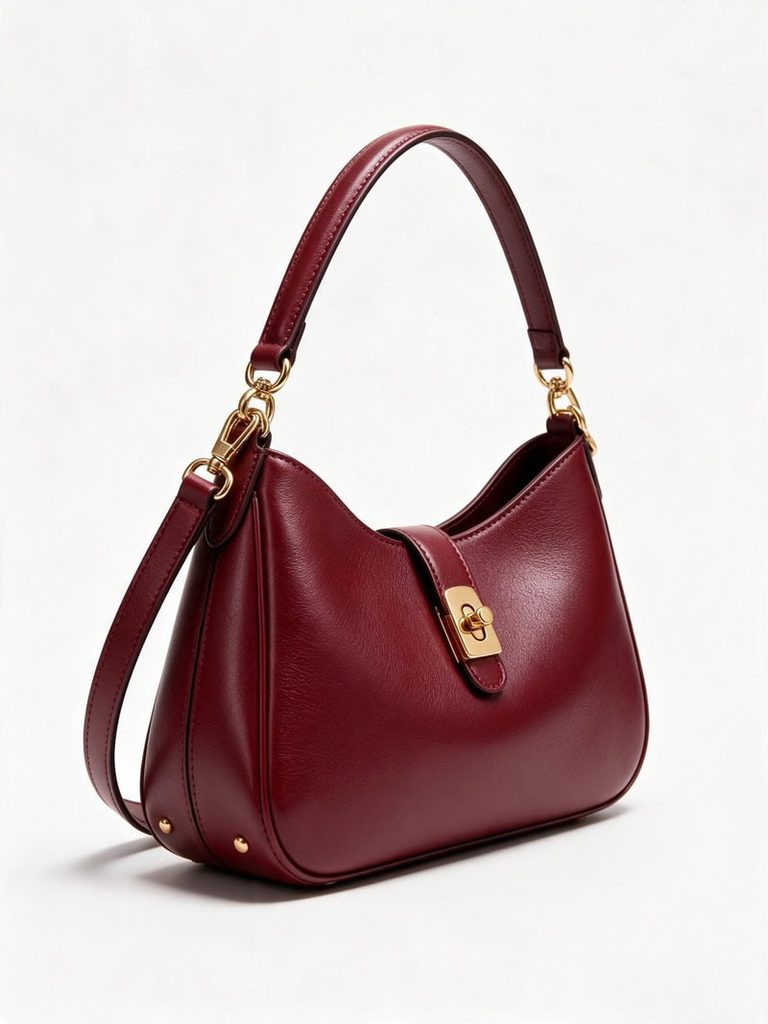
Start with clear product photos that show the item’s shape, color and details. You can also upload a photo of a person, such as a model or creator, if you want a specific look in the video.
For better video results, you can first use a flat lay generator to turn your product photos into clean, professional white-background product shots. Then upload the generated images to Product Promo Video as references for video generation.
Step 2. Write Your Video Brief
Once your images are ready, fill in the six fields in the Video Brief section. Each field controls a different part of the video:
- Goal: Explain what you want the video to achieve, such as introducing a new handbag or highlighting its storage space.
- Style: Choose the overall look. For a casual product recommendation, select UGC.
- Scene: Describe where the video takes place, such as a bright apartment, café or city street.
- Shots & Actions: Outline the sequence of shots and what happens in each one.
- Dialogue & Text: Add spoken lines, voiceovers or on-screen captions.
- Other: Include extra instructions for camera movement, pacing, transitions or brand requirements.
For the handbag example, you could use a simple concept: a creator shows the bag in her apartment and a casual café shop, puts it on her shoulder and demonstrates what fits inside.
You don’t have to write every detail from scratch. Fashion Diffusion also provides templates that you can use as a starting point. Choose a suitable example, then adjust the product, setting and dialogue to match your own idea.
Step 3. Generate and Review the Shot Plan
After completing your brief, generate your shot plan.
Fashion Diffusion turns your instructions into a visual sequence of shots, so you can review how the video will unfold before generating the final clip.
For the handbag example, the shot plan might include an opening close-up of the bag, a shot of the creator picking it up, and a final scene showing how it looks when worn. Check that the product appears consistently and that each action follows the intended sequence.
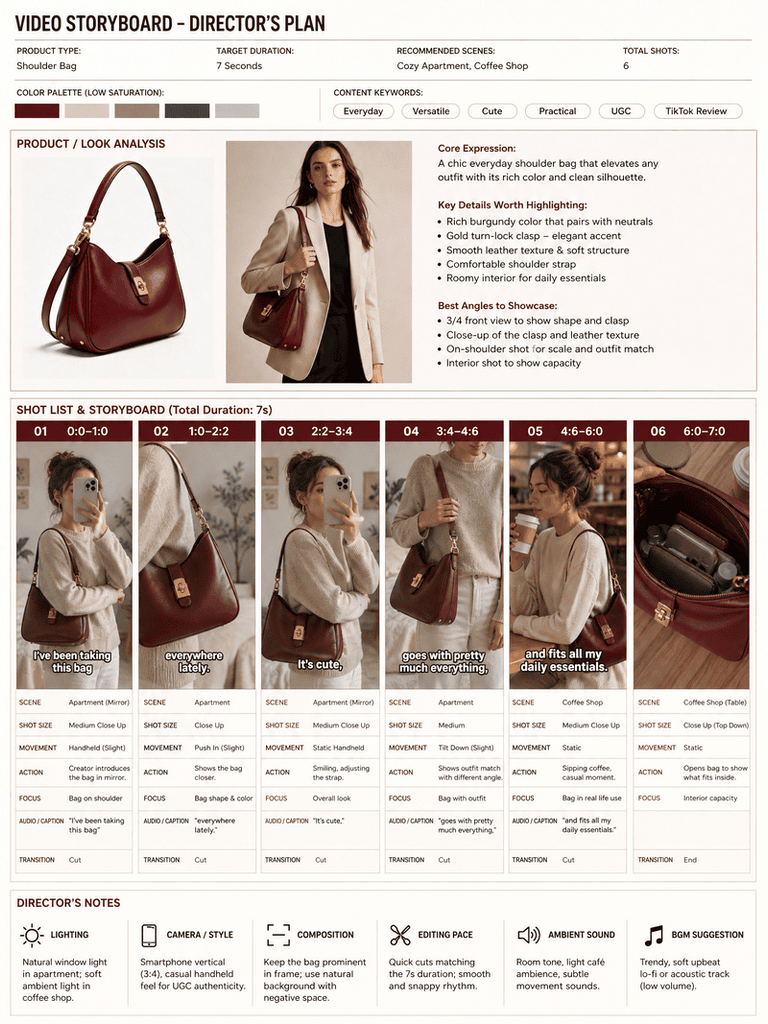
If a shot doesn’t match your idea, go back to the brief and adjust the relevant instructions. Reviewing the plan first helps you refine the concept before spending credits on video generation.
Step 4. Generate and Export Your Video
Once you’re happy with the shot plan, choose your video duration and aspect ratio. Fashion Diffusion supports clips from 4 to 15 seconds, so you can create anything from a quick product highlight to a short product story. After generation, review the video and download the result.
AI UGC Video Ideas for Different Products
Different products call for different video concepts. Sneakers work well with street-style footage, while skincare products are better suited to morning routines. Here are four ideas you can try with Fashion Diffusion’s Product Promo Video.
1. Sneakers: Casual Street Style
Show the sneakers in motion and highlight their design from different angles. Use a city sidewalk or an outdoor café as the setting. Start with a close-up of the shoes, then show the creator walking and styling them with a casual outfit.
Video Brief Idea:
- Goal: Highlight the sneakers’ design and everyday wearability.
- Style: UGC / Street Style
- Scene: City sidewalk with natural daylight.
- Shots & Actions: Close-up of sneakers, walking shot, full outfit reveal.
- Dialogue & Text: “These might be my new everyday sneakers.”
2. Skincare Serum: Morning Routine
A morning-routine concept works well for skincare because it shows the product as part of an everyday habit. Set the scene in a bright bathroom with soft natural light. Show the creator picking up the serum, applying a few drops and placing the bottle beside the mirror.
Video Brief Idea:
- Goal: Showcase the serum’s application and make it part of a daily skincare routine.
- Style: UGC / Morning Routine
- Scene: Minimalist bathroom with soft morning light.
- Shots & Actions: Serum bottle close-up, product application, creator holds the bottle near the mirror.
- Dialogue & Text: “This is the first thing I reach for every morning.”
3. Necklace: Get Ready With Me
Jewelry videos benefit from close-up shots that show how a piece looks when worn. Create a GRWM-style video featuring a creator getting ready for a day out. Show her fastening the necklace, adjusting the chain and checking the final look in the mirror.
Video Brief Idea:
- Goal: Highlight the necklace’s design and how it completes an outfit.
- Style: UGC / Get Ready With Me
- Scene: Bedroom vanity with warm natural light.
- Shots & Actions: Necklace close-up, creator fastens the chain, final outfit detail.
- Dialogue & Text: “A simple necklace makes such a difference.”
4. Knit Cardigan: Cozy Lifestyle
For knitwear, focus on texture, comfort and everyday styling. A cozy indoor setting with soft window light can create a relaxed lifestyle feel. Show the creator putting on the cardigan, adjusting the sleeves and sitting down with a cup of coffee.
Video Brief Idea:
- Goal: Showcase the cardigan’s texture, fit and everyday styling.
- Style: UGC / Cozy Lifestyle
- Scene: Cozy apartment by a large window.
- Shots & Actions: Cardigan close-up, creator puts it on, sleeve detail and relaxed lifestyle shot.
- Dialogue & Text: “This is exactly what I want to wear on a chilly day.”
These examples are starting points rather than fixed scripts. You can change the setting, actions and dialogue to match your brand’s visual style and the product features you want to highlight.
AI UGC Video Hooks to Capture Attention
The opening line or scene gives viewers a reason to keep watching. Instead of starting with a generic product introduction, try opening with a relatable problem, an unexpected detail or a specific benefit.
Here are a few hook ideas to adapt:
- Problem-Solution: “Why does every tote bag look good but fit nothing?”
- Unexpected Find: “I wasn’t planning to buy another pair, but…”
- Quick Result: “Here’s what changed my morning routine.”
- Personal Favorite: “The one accessory that pulls my whole outfit together.”
- Curiosity: “Wait until you see how much fits inside.”
Keep your opening short and connect it to what viewers will see next. A hook about storage space, for example, works best when the following shot actually demonstrates the bag’s capacity.
AI UGC Videos vs. Real Creator Videos
AI-generated UGC-style videos and traditional creator content serve different purposes. The right choice depends on your production budget, content needs and marketing goals.
| Factor | Real Creator Videos | AI UGC Videos |
| Production | Requires filming, scheduling and editing | Generated from existing product images and a video brief |
| Cost | Creator fees and production costs | Credits per generation |
| Content Variations | Limited by filming resources | Easy to test different scenes, hooks and styles |
| Authenticity | Features real people and their actual experiences | Recreates a casual UGC style but not genuine customer experiences |
| Best For | Testimonials, creator partnerships and brand storytelling | Product showcases, creative testing and social media content |
Real creator videos remain valuable when genuine product experiences and personal recommendations matter. AI-generated videos are useful when brands need more creative variations without arranging a new shoot for every product.
The two approaches can also work together. Brands can use real creators for testimonials and community building, while AI-generated videos help expand their product content library.
If you want to explore more AI-assisted video workflows, see our guide on creating fashion videos without filming.
Common AI UGC Video Mistakes and How to Fix Them
Even with a clear brief, AI-generated videos may not always match your expectations. Here are some common issues and ways to improve your results.
The Product Changes Shape Between Shots
This can happen when different shots describe the product inconsistently. Repeat the product name and key visual details in each shot, especially details such as color, shape and material.
Every Video Features the Same-Looking Person
If you want more control over the person in your video, upload your own model photo along with the product images. This gives the generation process a visual reference for the desired appearance.
Dialogue Feels Rushed
A script that is too long can be difficult to fit into a short clip. Keep spoken lines concise and focus on one main message rather than trying to explain every product feature.
Shots Don’t Match the Product
Sometimes the shot plan may interpret an uploaded image differently from what you intended. Use clear product photos, provide multiple angles where possible and refine the relevant instructions before generating the video.
On-Screen Text or Logos Look Distorted
AI-generated text and brand details may not always be accurate. Add final captions, product names and brand graphics during post-production rather than relying entirely on generated text.
Create Your First AI UGC Video with Fashion Diffusion
You don’t need a separate filming session to start experimenting with UGC-style product content. With a few product photos and a clear creative brief, you can explore different scenes, product interactions and video concepts.
Fashion Diffusion brings the process together, from uploading product images and building a shot plan to generating your final video.Start with one product, try a few different creative directions and see which style works best for your brand.
FAQ
An AI UGC video is an AI-generated video designed to look like user-generated content, with casual camera angles, everyday settings, natural product interactions and conversational dialogue. Brands use it for product demos and social media content on TikTok, Instagram Reels and YouTube Shorts.
Yes. Upload clear product photos to Fashion Diffusion’s Product Promo Video, fill in a video brief describing the style, scene, shots and dialogue, and the tool generates a shot plan and video from your images. You can also add a model or creator photo if you want a specific look.
The brief has six fields: Goal, Style, Scene, Shots & Actions, Dialogue & Text, and Other. Together they define what the video should achieve, how it looks, what happens in each shot and what is said. You can start from a template and adjust the product, setting and dialogue.
Fashion Diffusion supports clips from 4 to 15 seconds, which suits anything from a quick product highlight to a short product story. You can also choose the aspect ratio before generating.
Repeat the product name and key visual details, such as color, shape and material, in every shot description. Using clear photos from multiple angles also helps. Reviewing the shot plan before generating lets you catch inconsistencies before spending credits.
Not entirely. AI UGC videos are well suited to product showcases, creative testing and producing many variations without new shoots. Real creator videos remain better for genuine testimonials, creator partnerships and brand storytelling, and the two approaches work well together.


