

For plus size shoppers, AI virtual try on is solving one of online shopping’s oldest frustrations: you can’t tell how a garment will actually look on your body until it arrives. Size charts don’t tell you how a fabric drapes across your shoulders, and the model in the photo doesn’t share your proportions. Return rates for ill-fitting plus size purchases run between 30 and 40 percent — and this is what changes that.
This guide walks you through how the technology works, how to get accurate results on your body, and how to use it across the situations where plus size fit matters most.
Why Standard Virtual Try On Often Fails Plus Size Shoppers
Most tools approach virtual try-on the same way: take the garment image, scale it up, and layer it over your photo. For straight sizes, the distortion is manageable. For plus size bodies, it falls apart fast.
The overlay problem
Basic virtual try-on tools don’t recalculate fit — they reposition. The garment image gets stretched or scaled to roughly match your frame, but the fabric physics don’t change. A wrap dress that drapes softly on a size 8 model gets mechanically enlarged onto a size 20 body without any recalculation of how the fabric would actually behave. The result looks pasted-on because it is.
Proportions aren’t linear
Standard sizing assumes that going up in size means scaling up uniformly. Real plus size bodies don’t work that way — the relationship between bust, waist, hip, and shoulder width shifts as size increases, and no two size 18s carry their measurements the same way. Tools that work from a size template rather than reading your actual body miss this entirely.
What accurate tools do differently
Body contour recognition changes the output quality. Instead of overlaying, the AI maps your specific silhouette from your photo — shoulder width, waist curve, hip volume — and regenerates how the garment would sit against those measurements. Fabric drape, stretch, and proportion are calculated from your shape outward. Fashion Diffusion’s AI virtual try on uses this approach, which is why results at size 16 and above look substantially different from what basic overlay tools produce.
How to Use AI Virtual Try On for Plus Size Fashion: Step by Step
The process takes under two minutes once you have the right inputs. Here’s what to do.
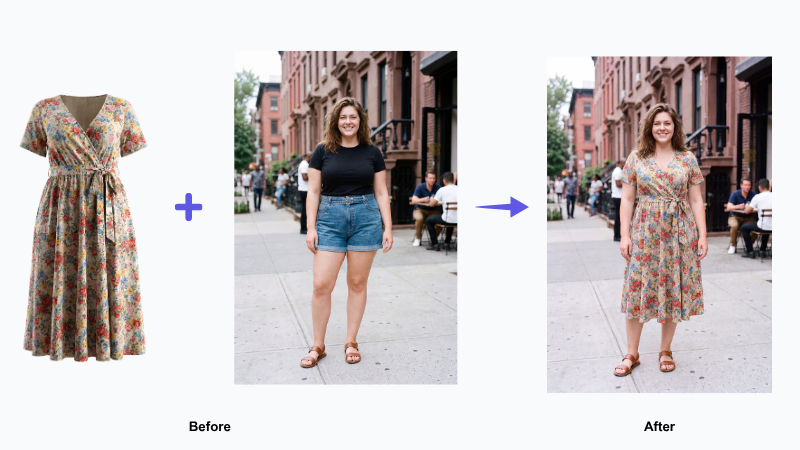
Step 1: Prepare your photo for AI virtual try on
Upload a clear, full-body photo of yourself. You don’t need a professional shot — a photo taken against a plain wall in natural light works well. A few things that improve accuracy:
- Stand straight and face forward. Side angles or poses with crossed arms make it harder for the AI to read your body contours correctly.
- Wear fitted clothing. Baggy layers obscure your silhouette and reduce accuracy. A simple T-shirt and jeans give the AI a clean read on your shape.
- Use a plain background. Busy backgrounds can interfere with edge detection. A white wall or neutral backdrop is ideal. If your photo background isn’t clean, you can use Fashion Diffusion’s background remover to fix it before uploading.
- Include your full body in the frame. Cut-off feet or heads reduce the quality of the proportion mapping.
Step 2: Upload the garment you want to try
You can use an image from anywhere: a product page, a brand website, an Instagram post. The best garment photos for accurate results are:
- Flat-lay or hanger shots, where the full garment is visible
- On-model photos from the front, showing how the item is meant to be styled
- High resolution images, where fabric texture and cut details are clearly visible
Avoid cropped images, heavily stylized editorial shots, or photos where most of the garment is obscured. Don’t have a clean product image? Fashion Diffusion’s flat lay generator turns any garment photo into a studio-ready flat lay instantly.
Step 3: Generate your virtual try on preview
Once both images are uploaded, Fashion Diffusion’s AI processes your photo and renders the garment onto your body — think of it as your own plus size virtual fitting room, available any time without a queue. Fashion Diffusion typically generates results within seconds. The output shows the garment fitted to your specific proportions — not scaled up from a smaller template.
Step 4: Evaluate the fit before you buy
Look at the preview critically. Check how the neckline sits, where the waist hits, whether the hem falls where you’d expect. If something looks off, try a different garment photo or adjust your input image. One accurate preview is more useful than five rushed ones.
When you’re confident in the fit, you have the visual evidence to shop with intention rather than optimism.
3 Ways Plus Size Shoppers Use AI Virtual Try On
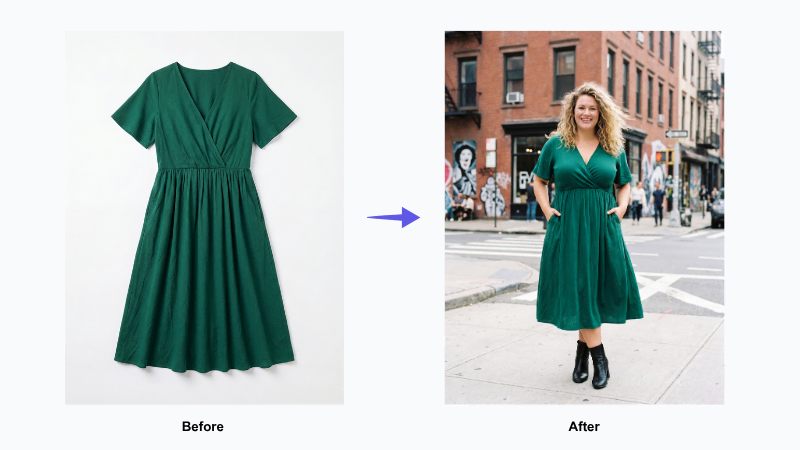
Beyond the basic buy-before-you-try use case, there are a few specific ways plus size shoppers are getting the most out of this technology.
See how a garment’s cut and proportion actually land on your body
Where the waist sits, how the neckline falls, whether the hem hits at the knee or above it — these details don’t show up in a size chart, but they’re exactly what determines whether a piece looks intentional on your body or just present. Upload the product image and see how the cut and length land on your specific frame before you commit. If you’re a brand looking to show products on plus size bodies at scale, Fashion Diffusion’s AI model generator handles that without a photoshoot.
Style for a specific occasion before you commit
Event dressing is high stakes, and return windows often expire before the occasion arrives. Using the virtual try-on tool lets you run through multiple options in one sitting — compare a wrap dress against a midi skirt against a jumpsuit — and arrive with confidence rather than a backup option still in your car.
Experiment with trends your instinct would have skipped
Plus size shoppers learn early which silhouettes “work” and stick to them, passing on things they can’t visualize on themselves. Try the barrel-leg trousers, the asymmetric hem, the sheer overlay — see it on your body before deciding whether to dismiss it. The styles you’ve been skipping for years might be exactly the ones that work. You just haven’t seen them on your body yet.
AI Virtual Try On Is Changing How Plus Size Shoppers Buy Online
Plus size fashion has always deserved better than the guessing game online shopping turned it into. The wrong size chart, the model who doesn’t share your proportions, the dress that looked nothing like the photo — these aren’t small frustrations, they’re the reason so many purchases end up returned or sitting unworn in a wardrobe.
AI virtual try-on doesn’t fix the fashion industry, but it shifts the balance back in your favor. With Fashion Diffusion, you see the cut, the proportion, the length — on your body, before you spend anything. That’s a meaningfully different way to shop.
Try Fashion Diffusion‘s plus size virtual try on and see what actually works on you!
FAQs
Yes — but the quality depends heavily on how the tool is built. Basic overlay tools that paste a garment image onto your photo without recalculating fit are not accurate for any body type, and the inaccuracy is more visible at larger sizes where proportional differences are more pronounced. Tools built on body contour recognition — where the AI reads your specific silhouette and re-renders the garment against your measurements — produce results that are genuinely useful for plus size shoppers. Fashion Diffusion’s virtual try-on uses this approach.
Yes, Fashion Diffusion offers free access to the virtual try-on tool. You can upload your photo and try on garments without creating an account. Higher-volume usage and additional features are available on paid plans, but the core try-on functionality is accessible without payment.
A clear, full-body photo taken from the front, in natural light, against a plain background, wearing fitted clothing. The AI uses your silhouette to calculate how the garment will sit on your body — the cleaner it can read your outline, the more accurate the result. Photos that are blurry, heavily filtered, taken at an angle, or show you in bulky layers will produce less accurate previews.
Yes. You can upload a garment image from any source — a product page, a brand website, a saved screenshot. The tool isn’t limited to a specific retailer catalog. As long as the garment image is clear and shows the full item, the AI can use it.
Yes. The tool reads your body from the photo you upload, rather than working from a preset size range. This means it adapts to whatever proportions are in your image, including larger sizes that many standard try-on tools handle poorly. The accuracy depends on the quality of your input photo, not on where your size falls on a chart.
Yes. Fashion Diffusion’s virtual try-on is also used by fashion brands and e-commerce sellers who need to show their products on diverse body types without running separate photoshoots for every size. You can generate on-model imagery across a range of sizes from a single flat-lay product photo. This is particularly useful for brands that want to show their plus size range on representative bodies without the cost of extended-size model sessions.


