

Creating Shopify clothing photos used to be one of the biggest bottlenecks in our launches.
Every new collection meant booking studios, waiting for samples, and scheduling models. We also spent days editing images for PDP pages, ads, emails, and social media. As a Shopify DTC brand, repeated photoshoots consumed 60–70% of our content budget and delayed launches by 10–14 days.
The bigger our catalog grew, the harder it became to keep up.
That’s why we switched to an AI-powered workflow. We now use Fashion Diffusion AI to create high-quality Shopify clothing photos from a single flat lay or product image. This helps us avoid organizing new photoshoots for every collection launch.
In this guide, we’ll share the 4-step workflow we use as a Shopify operator: building clean flat lays, creating AI models, localizing for different audiences, and preparing final images ready for our store.
This approach has helped us cut photography costs by over 65% and launch new collections 2–3 times faster.
Why AI Shopify Clothing Photos Are Replacing Traditional Ecommerce Shoots
For most Shopify clothing brands, traditional product photography stops being scalable once the catalog starts growing. What works for a small monthly launch quickly becomes difficult to maintain when you’re managing dozens of SKUs, multiple colorways, and weekly campaigns.
A single product no longer needs just one clean studio photo. Every item now needs more than one studio photo. Brands need model shots, detail close-ups, and lifestyle images. They also need vertical creatives for TikTok and Reels, homepage banners, email assets, and multiple crops for Meta ads. One approved hoodie photo can easily turn into 15–20 different assets across channels.
For small ecommerce teams, the bottleneck is no longer product sourcing — it’s content production. Coordinating photographers, models, editing, retouching, and reshoots slows down launch cycles and increases costs fast. Even minor issues like missing angles or inconsistent lighting can delay campaigns by days.
That’s why many Shopify apparel brands are moving toward AI-generated product photography workflows. Instead of organizing new shoots for every product update or ad variation, teams can now generate lifestyle images, model photos, and campaign creatives in minutes at a fraction of the traditional production cost.
For a detailed comparison, see our guide: AI vs Traditional Photoshoots – Cost, Speed, and Quality.
How to Create Shopify Clothing Photos with AI
After testing multiple AI tools, we found the real advantage wasn’t creating completely new images — it was reusing one solid product shot to generate everything the store needed. We now rely on a repeatable workflow using Fashion Diffusion AI. It has become our main platform for turning a single flat lay into dozens of high-converting AI Shopify product images.
It helps us launch faster, cut photography costs, and show our clothes on diverse models without scheduling endless photoshoots.
Step 1: Start with a Clean Flat Lay
For most Shopify stores, a strong foundation is everything. We always begin with a clean, well-lit flat lay or product photo. If we don’t have studio shots yet (especially during pre-order or sample stages), we use the Flat Lay Generator to create consistent overhead shots quickly.
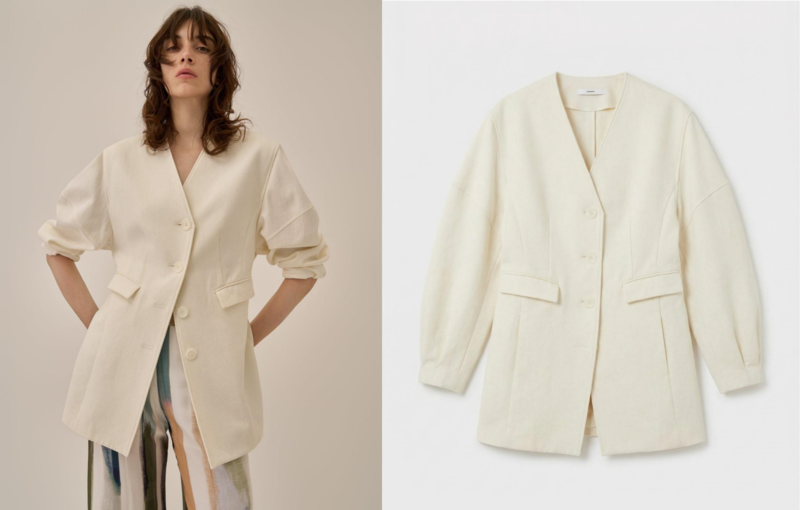
This step is crucial for Shopify sellers. A clean, well-lit flat lay helps the AI capture fabric texture, stitching, and drape more accurately. One strong product image can then generate dozens of model photos. This saves time and reduces the need for repeated photoshoots when adding new colors or sizes.
For small DTC teams, this single asset becomes the foundation for entire product launches.
Step 2: Try Clothes on AI Models
Next, we upload the flat lay to AI Virtual Try-On tool. This creates realistic on-model visuals that shoppers actually want to see.
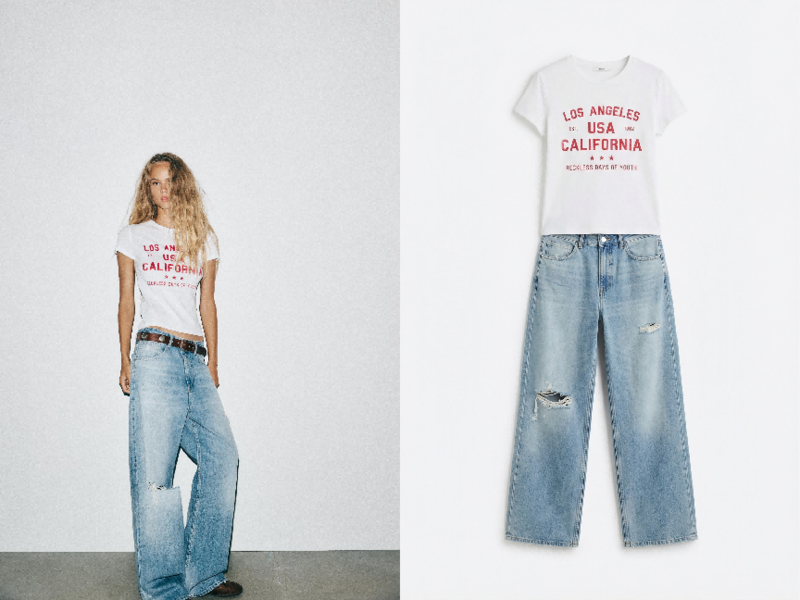
This step is incredibly valuable for DTC brands. Customers need to visualize how a garment drapes and fits on a real body before buying.
We select poses based on the product type. Front views work best for t-shirts and hoodies. Side or back views are ideal for pants and jackets. The result? Lower return rates and higher PDP conversion rates. Shoppers can make confident decisions faster — no waiting for real model photos.
Step 3: Create Models That Match Your Target Customers
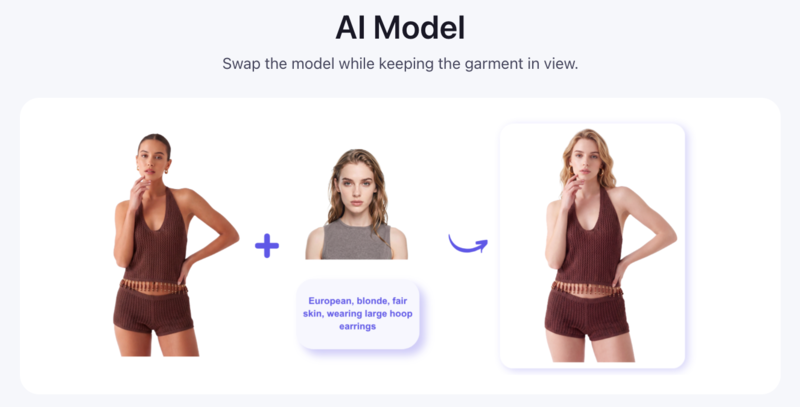
This is the part we use most. With the AI Model Generator, we can create models that actually look like our target audience.
We can control age, ethnicity, body type, skin tone, and hairstyle through simple prompts. For example: “26-year-old Latina woman, athletic build, warm tan skin, long curly hair, casual studio lighting.”
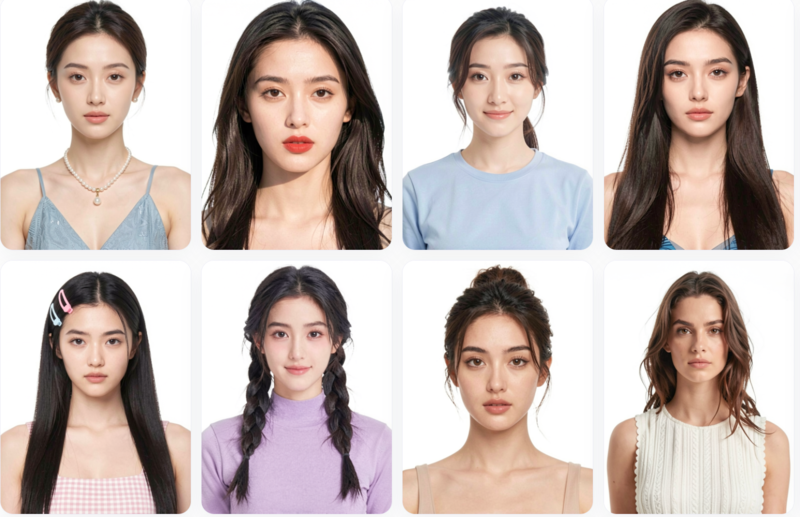
The tool only borrows facial features from their library and follows your description for everything else. This lets us create inclusive, relatable product photos for different markets without booking multiple models or reshooting.
If the body looks perfect but the facial expression feels off, we use the Face Swapper to fine-tune it. This small tweak makes a big difference. It helps build trust and boosts click-through rates (CTR) on product collection pages.
We can easily create inclusive, relatable product photos for different markets. The result? Higher international sales and way better engagement on our collection pages.
Step 4: Add Background Context & Upscaling
Once the model looks right, we replace backgrounds with AI. We place the outfit in real-life scenes like city streets, cozy homes, beach settings, or clean studio spaces. This helps tell a lifestyle story that resonates with our customers.
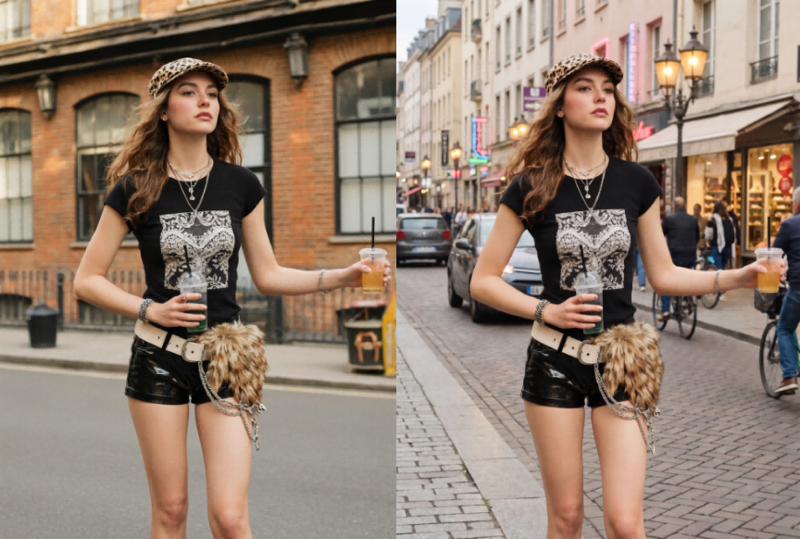
Finally, we enhance every visual with AI to create high-resolution fashion imagery that looks crisp across Shopify product pages and mobile devices. Crisp images matter a lot for Shopify’s zoom feature and mobile shopping experience.
Step 5: Final Review and Shopify Sync
One mistake we see often is over-styling AI product photos. We found that flashy, dramatic AI images often reduce buyer trust and lower conversion rates on product pages. Customers prioritize understanding the fabric texture, fit, and silhouette over artistic flair. Stick to clean lighting and realistic presentation to ensure your brand remains professional and trustworthy.
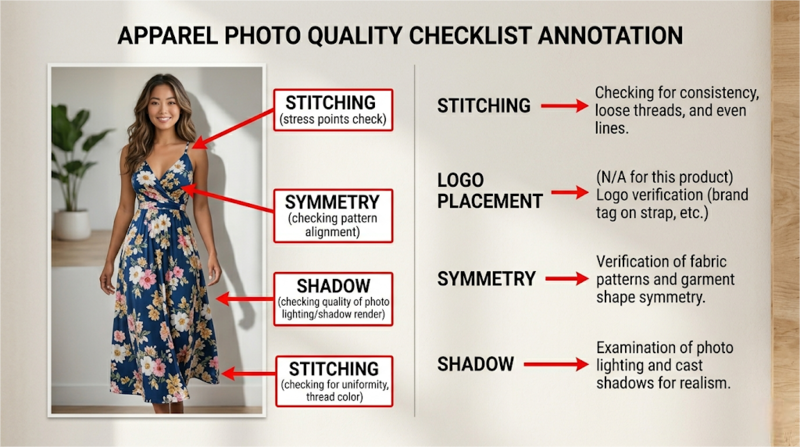
Before uploading anything to your store, do a quick quality check. Look closely at stitching, sleeve shape, fabric folds, and logo placement to make sure everything looks natural and accurate. Small visual mistakes are much easier to notice on mobile, where most customers browse and zoom into product images. A quick review prevents costly returns caused by visual mismatches between the photo and the physical product.
Before exporting, make sure your visuals follow common ecommerce image optimization practices for sizing, compression, and image consistency across your store.
We typically use square 2048×2048 px images because they stay sharp enough for zoom without making the page unnecessarily heavy. JPEG works well for most apparel photos, while PNG is only needed for transparent backgrounds. Compress every file before upload so mobile pages still load smoothly.
Finally, don’t skip your alt text. Clear descriptive alt text helps with accessibility and give search engines more context about your products. Simple things like fast-loading images, consistent formatting, and accurate product visuals can make a noticeable difference in both SEO and conversion rates.
Results: What Actually Improved After Switching to AI Photos
After a few launches, the biggest change was not getting “better-looking” product photos. It was how much easier product launches became. Once we had one approved Shopify product image, we could reuse it across PDPs, collection banners, Meta ads, email campaigns, and short-form social content instead of creating separate assets for every channel.
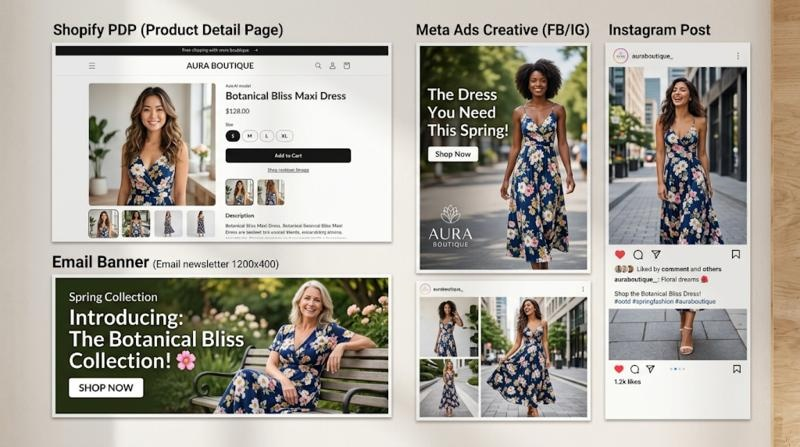
This saved a surprising amount of time for a small ecommerce team. We spent less time coordinating shoots, resizing assets, or waiting on revisions, especially during larger product drops. Different crops, backgrounds, and campaign variations could all be generated from the same base image, which made launches feel much more manageable operationally.
Over time, we also noticed that AI reduced a lot of the hidden production costs around sampling and reshoots. Instead of producing multiple physical samples just to test colors, fabrics, or styling directions, we could review many of those decisions digitally first. That helped us avoid unnecessary revisions and sped up parts of the approval process before launch.
AI tools also helped us launch campaigns earlier. For preorder collections or weekly drops, we no longer had to wait for every final sample to arrive before building marketing assets. In many cases, flat lays or on-model photos were enough to prepare ads, landing pages, and email creatives ahead of launch.
We also found that combining AI models with virtual try-on tools made styling much faster, especially when showing multiple outfits or colorways in the same launch.
Instead of waiting for every sample and model shoot to be ready, we could test different looks much earlier in the process. The workflow felt very similar to the way smaller brands are adopting AI models for fashion stores to produce product imagery more efficiently.
Using AI to Create Shopify Product Images
AI Shopify clothing photos are no longer just a trend — they are becoming the standard workflow for modern Shopify fashion brands.
For us, AI worked best as a practical production tool, not a replacement for creativity or photography. It simply made product launches easier to manage when timelines were tight and content demands kept growing.
We still use traditional shoots when needed, but AI helped fill the gaps between launches, sample delays, and constant content updates. Even small things like generating extra model variations or retouching saved more time than we expected.
If you run a Shopify fashion store, start small. Start with AI fashion ecommerce tools and explore how AI-generated clothing photos fit into your existing workflow. That’s usually enough to see where it actually helps.
Even testing AI on a single product drop can make content production faster, more flexible, and easier to scale.
FAQ
Many Shopify sellers now use AI Shopify clothing photos instead of organizing traditional studio shoots. They upload a flat lay or product image into AI tools to generate model photos, virtual try-ons, and ecommerce-ready visuals for product pages, ads, and collection banners. This workflow helps brands launch products faster while reducing photography and sampling costs.
Yes. AI Shopify clothing photos can improve ecommerce conversion rates when the images accurately show fit, fabric texture, and product details. Shopify brands often use AI-generated model photos and clean PDP images to create more consistent storefronts, improve mobile shopping experiences, and help customers visualize products before purchase.
AI model generators allow Shopify clothing stores to create realistic on-model product photos from a single clothing image or flat lay. Sellers can generate different poses, body types, and styling variations without reshooting products. Many ecommerce brands use AI model generators to scale weekly product drops and create localized marketing assets more efficiently.
Yes. Shopify allows AI-generated product photos as long as the images accurately represent the product being sold. Many fashion ecommerce brands use AI Shopify clothing photos for product pages, lookbooks, and ads. The most important requirement is maintaining realistic product details so customers clearly understand the item before purchasing.


