

Creating professional on-model photos for your fashion products can be both expensive and time-consuming.
A small fashion brand planning to launch a 10-piece collection might spend hundreds or even thousands of dollars just to hire models, book a studio, and pay a photographer for a single day of shooting. Multiply that across multiple color variants, seasonal updates, or additional SKUs, and the costs and logistics quickly become overwhelming.
Fortunately, today’s AI fashion design tools make it possible to create on-model fashion photos without photographers, saving you time, money, and effort while producing images that actually drive sales.
Why On-Model Photos Convert Better Than Flat Lay Product Images
Industry benchmarks show that on-model images outperform flat-lay photos in click-through rate and conversion. For example, listings featuring on-model photos can achieve 25-35% higher CTR on collection pages and 20-30% higher conversion rates on product pages compared with flat-lay images.
This performance gap highlights a clear trend: customers prefer seeing clothes on a real or virtual model rather than just flat or mannequin shots. But why is that the case?
Customers Need to Visualize Fit and Silhouette
Shoppers want to see how clothing drapes, fits, and moves on a body. On-model images communicate proportions much more effectively than flat-lays.
On-Model Images Reduce Purchase Uncertainty
By seeing the garment on a model, customers can better imagine themselves wearing it. This lowers hesitation and reduces the likelihood of returns.
Real-Life Wear Drives Engagement
Customers naturally engage more with visuals that demonstrate clothing in context—showing pose, movement, and styling cues that flat-lays simply cannot provide.
Why Traditional Fashion Photography No Longer Scales for E-commerce Sellers
Traditional fashion photography may work for a small number of products, but it quickly becomes difficult to scale as your catalog grows. For e-commerce sellers managing frequent product launches, multiple colorways, and seasonal updates, the traditional workflow often means higher costs, longer timelines, and inconsistent results.
Every new SKU typically requires model booking, studio rental, photographer fees, styling, and post-production. When multiplied across dozens or even hundreds of products, the cost and effort increase rapidly.
High Cost Per SKU
Each product variation often needs its own shoot. Different colors, styles, or campaign needs can all mean additional model and studio costs, making photography one of the biggest operational expenses for fashion sellers.
Slow Turnaround Time
Traditional shoots take time to plan, schedule, edit, and deliver. This can delay product launches and make it harder to respond quickly to market trends.
Difficult to Maintain Consistency
Different models, lighting setups, and photographers can lead to inconsistencies across product pages, which may affect the overall look and professionalism of your store.
The Best Fashion Photography Alternative: AI Virtual Try-On
For e-commerce sellers, the biggest advantage of AI virtual try-on is how simple the workflow is compared with a traditional photoshoot.
Instead of coordinating a model, studio, photographer, and post-production team, the process can be completed in just a few steps:
Upload your product image → Choose a model → Generate the final result.
In most cases, the entire process takes only a few minutes, making it a much faster and more scalable fashion photography alternative for growing product catalogs.
This simplicity is especially valuable for brands that need to launch new SKUs quickly or test multiple styles and colorways at scale.
Quality Comparison: From Flat Lay to On-Model in Seconds
The biggest question for most sellers is: Can AI-generated results actually look professional enough for e-commerce?
The answer is increasingly yes.
Recent virtual try-on examples from commercial tools show highly realistic outputs, including preserved fabric texture, print details, drape, and garment proportions.
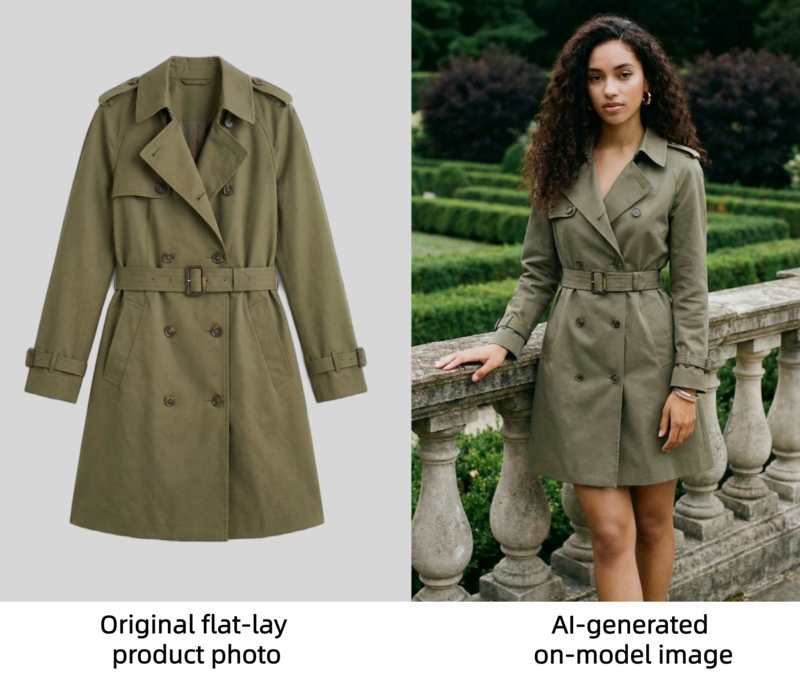
For example, WeShop AI demonstrates a clear before-and-after workflow where a flat-lay product image is transformed into a studio-style model photo in around 30 seconds.
For additional inspiration, platforms like Fashion Diffusion also show how AI can generate photo-realistic clothing visuals across different body types and sizes. Below is a direct comparison: the texture of the clothing in the AI-generated on-model image clearly captures the details from the flat lay image.
Supported Garment Types
AI virtual try-on tools now support a wide range of fashion categories, including:
- dresses;
- tops and blouses;
- T-shirts and hoodies;
- jackets and coats;
- pants and denim;
- skirts;
- knitwear;
- activewear;
- two-piece sets.
Many tools also work well with:
- ghost mannequin photos;
- flat-lay images;
- clean white-background product photos.
This makes AI clothing photography especially practical for fashion brands, Shopify sellers, and marketplace stores.
Step-by-Step: How to Create AI Model Photos for Clothing with Fashion Diffusion
Now that you’ve seen how simple AI virtual try-on can be, let’s walk through the actual process step by step.
Using Fashion Diffusion, you can turn a flat-lay or product image into a professional on-model photo online in just a few clicks.
Step 1: Upload Your Product Image
Start by uploading a clear product photo.
For the best results, use:
- a flat-lay image;
- a ghost mannequin image;
- a clean white-background product photo.
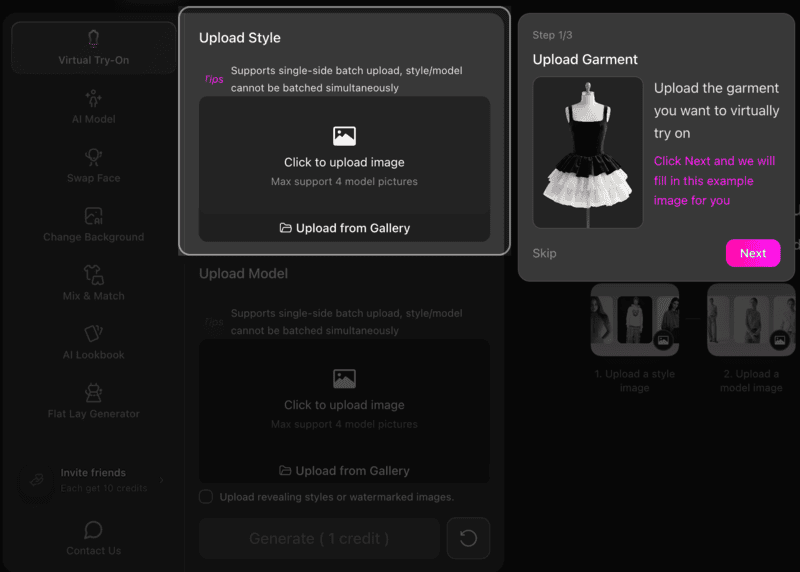
Make sure the garment is fully visible and front-facing. High-resolution images with clear fabric details will help the AI preserve texture, shape, and fit more accurately.
Step 2: Select a Model
Next, choose the model image or model style you want to use.
This is where the AI virtual try-on workflow becomes especially useful for e-commerce sellers.
You can quickly test:
- different poses;
- body types;
- genders;
- campaign aesthetics.
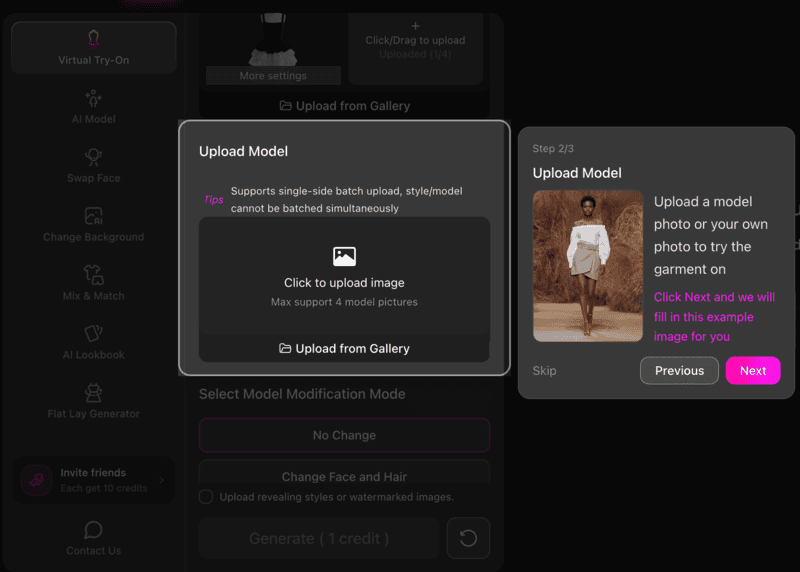
This makes it easy to create visuals for different audiences without reshooting the product.
Step 3: Generate the On-Model Result
Once both images are uploaded, click generate. You may choose the generation mode before. Generating a single image or a set of 4 business photos with different angles is supported.
The AI will automatically place the garment onto the selected model and create a realistic on-model image. In most cases, the result is ready within seconds.
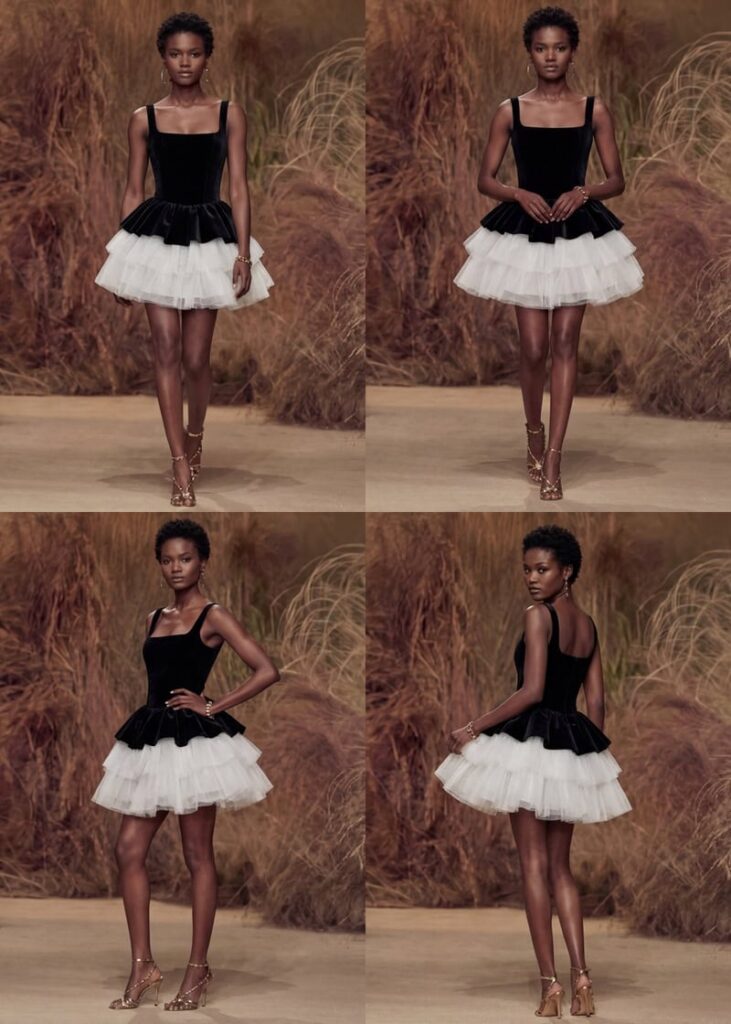
This is one of the fastest ways to try on clothes online for product photography and catalog creation.
Tips for Better Results
To get the most realistic output from an AI fashion photography tool, keep these best practices in mind:
- Use bright, evenly lit product images;
- Keep the clothing centered;
- Avoid folded garments;
- Preserve sleeves, collars, and hems clearly;
- Use clean background images.
The better the input, the more realistic the generated model photo will look.
Step 4: Refine and Export
After generation, review the output and make any necessary refinements.
For example, you may want to:
- Adjust the fit;
- Improve garment alignment;
- Regenerate with another model;
- Create multiple angles for listing pages.
If you need more precise control, Fashion Diffusion also offers advanced features such as AI Inpainting, and Recolor, allowing you to further refine the styling, modify specific garment details, or test different color variations until the final result matches your expectations.
Once satisfied, export the image for use across Shopify, Amazon, TikTok Shop, social ads, and PDP pages.
Best Use Cases for AI Virtual Try-On in E-Commerce
AI-generated on-model fashion photos without photographers are particularly valuable for e-commerce sellers who need professional-looking product visuals without the cost and complexity of traditional photography. Here’s who benefits most:
Small e-commerce brands with limited photography budgets
For new or boutique brands, hiring models and booking studios for every SKU can be expensive. AI virtual try-on lets these sellers create professional on-model images at a fraction of the cost, helping them compete with larger retailers visually.
Independent sellers looking to scale quickly
Independent sellers often launch new products frequently. Traditional photography can’t keep up, but AI tools enable sellers to generate multiple on-model images in minutes. Today, many AI platforms specifically support sellers on marketplaces by turning a single product photo into multiple on-model images within minutes.
Stores with multiple SKUs or color variants
Fashion items often come in multiple colors and styles, each requiring separate photography. AI virtual try-on makes it easier to generate consistent visuals across all variants without photographers. Platforms built for large fashion catalogs now specifically position this as a solution for scaling product imagery.
Marketing and social media campaigns
AI-generated on-model images are also ideal for social media, lookbooks, and ad campaigns. Brands can quickly produce content for different platforms without scheduling multiple photoshoots, maintaining consistent style and quality.
Start Creating High-Converting On-Model Photos Today
Creating high-converting fashion product images no longer needs to involve expensive photoshoots, model bookings, and long production timelines.
With AI virtual try-on, e-commerce sellers can now turn flat-lay product photos without models into realistic on-model images in minutes.
Whether you are a growing Shopify brand, an independent marketplace seller, or a team managing large-scale product launches, AI clothing photography offers a faster, more scalable way to produce professional visuals that help drive clicks, conversions, and customer confidence.
If you are ready to create on-model fashion photos without photographers, now is the perfect time to explore AI virtual try-on. Try Fashion Diffusion’s AI fashion photography tool today, and see how quickly you can transform a single product image into high-quality virtual model photos e-commerce for your store, ads, and social campaigns!
FAQ
Yes, AI-generated model photos work extremely well for e-commerce. They are widely used for Shopify stores, Amazon listings, TikTok Shop, and other online marketplaces. By showing how garments fit and drape on a real or virtual model, these images help customers better visualize the product, which can improve conversions.
AI virtual try-on tools support a wide range of clothing categories, including dresses, tops, T-shirts, hoodies, jackets, pants, skirts, knitwear, and activewear. In most cases, any product with a clear front-facing image and visible garment details can be used.
In most cases, generating an AI on-model image takes only a few seconds to a few minutes, depending on the platform and the selected output mode. Some tools like Fashion Diffusion also allow you to generate multiple professional business photos with different angles in a single workflow, which further speeds up catalog production.
Yes. After the initial image is generated, you can continue refining the result using advanced features. These features allow you to adjust the fit, improve garment alignment, modify specific design details, and test multiple color variations until the final output meets your expectations.
For many e-commerce sellers, AI virtual try-on is often the more practical option. It is faster, more scalable, and significantly more affordable than traditional photoshoots, especially for brands managing multiple SKUs and frequent product launches. While traditional photography may still be suitable for campaign-level editorial content, AI is often the better solution for everyday product listings and catalog expansion.


