

Your product photos are already an asset. Here’s how one contemporary women’s label used Fashion Diffusion AI to get more formats — and more value — out of photography it had already produced.
What Is Lilla P?
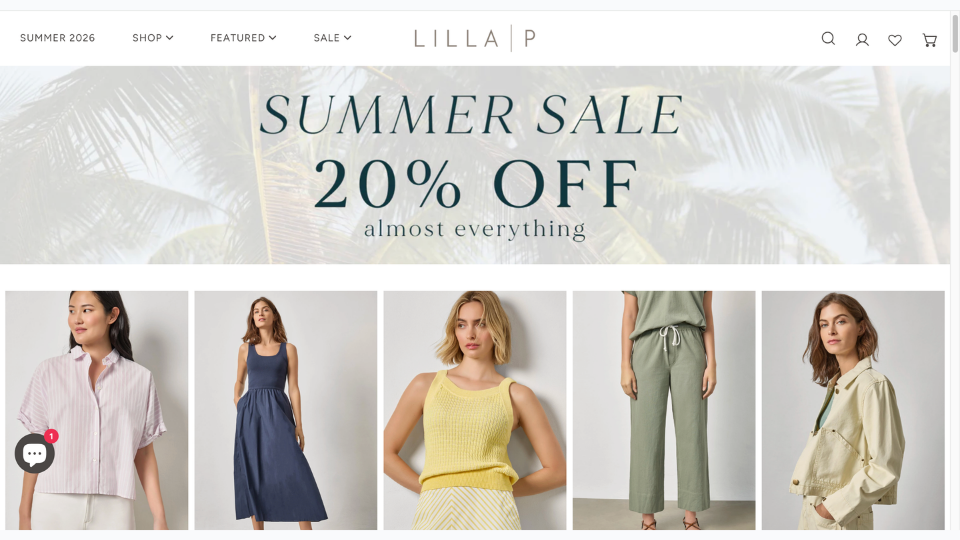
Lilla P is a women’s fashion brand founded in New York in 1998. Built around elevated basics and relaxed contemporary styling — tops, knits, dresses, trousers, and outerwear — the brand has grown into a full seasonal collection with a loyal following across the US market.
Like most fashion brands at this stage, Lilla P produces regular product photography to support its seasonal catalog. Every new piece needs to be shot, edited, and made ready for use — a continuous production commitment that grows as the collection grows.
The Challenge: The Same Garment, Multiple Format Requirements
Product photography is not a one-size-fits-all deliverable. A single garment may need to appear in several different formats depending on how and where it is being presented — and not every format can be repurposed from another.
On-Model Photography Doesn’t Always Transfer
On-model photography is the standard format for direct-to-consumer channels. It shows the garment in context, on a body, in a way that helps customers understand fit, proportion, and styling. For a brand’s own webshop and marketing materials, it is the obvious choice.
On-model photography introduces more variables. The model, background, and styling can all affect consistency. This makes the images harder to reuse across different channels. When brands need a clean and neutral product image, on-model photos often need to be replaced instead of repurposed.
Flat Lay Photography Has Always Required a Separate Shoot — Until Now
Flat lay imagery — a clean, overhead photograph of the garment laid flat — is the format that removes those variables. The garment is the subject. Nothing else competes for attention. Fabric texture, construction detail, and silhouette are all clearly readable.
Historically, producing flat lay meant a separate shoot. Different setup, different lighting, different post-production requirements. For brands that need both formats across a full catalog, that has traditionally meant running two parallel production tracks — doubling the time and cost of imagery for every piece in the collection.
A Growing Catalog Makes the Problem Bigger
Lilla P releases new pieces continuously across the season. Every new arrival adds to the production queue. The broader the catalog, the more the dual-format requirement compounds — and the more pressure it puts on the team to keep imagery current without proportionally expanding the photography budget.
How Lilla P Uses Fashion Diffusion AI to Extend Its Photography
Lilla P uses a single Fashion Diffusion AI feature — the Flat Lay Generator — to derive flat lay imagery directly from existing product photography. It is a practical application of the broader shift toward AI-driven fashion workflows that allows brands to produce more from the assets they already have.
AI Flat Lay Generator — Convert Any Product Photo Into a Clean Flat Lay
Flat Lay Generator takes an existing garment image — including on-model shots — and renders a clean, realistic flat lay version. Accurate fabric texture, clear construction detail, consistent presentation. The output reads as a purpose-shot flat lay, not a processed version of the original.
This is not background removal. It is not a crop. It is a generated flat lay built from an existing image — a new format derived from a source that already existed.
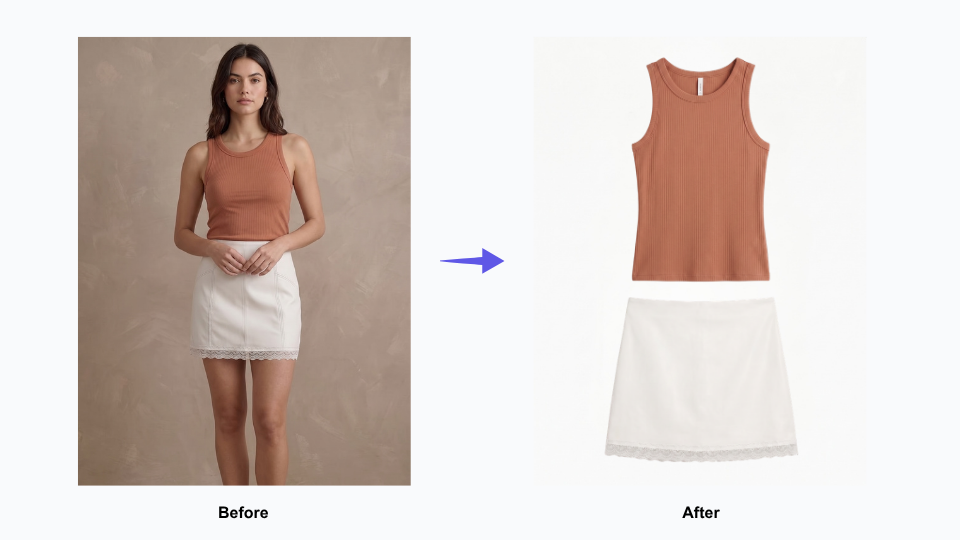
Before: Every Product Required Two Separate Photography Sessions
Previously, getting both an on-model image and a flat lay for the same piece meant two separate production sessions. Two different setups, two rounds of editing, twice the time per SKU. For a single garment, manageable. Across a full seasonal catalog, it adds up quickly — and creates a continuous scheduling dependency that slows down how fast new pieces can be fully ready.
The New Workflow: One Product Shoot, On-Model and Flat Lay Both Ready
Now, a garment gets photographed once. The flat lay version is generated from that same source image using the Flat Lay Generator. Both formats come from a single shoot, processed in sequence rather than in parallel — turning what used to be two separate production sessions into one continuous workflow.
Consistent Flat Lay Imagery Across Every Product Category
One practical advantage of AI-generated flat lay is consistency across different product types. A knit cardigan, a woven shirt, a structured jacket — each presents differently as a physical garment, and human photographers inevitably approach each one slightly differently. AI applies the same rendering logic to every piece, producing a consistent visual presentation across the full catalog.
For brands managing multiple product categories across every season, consistency matters. A cohesive image library makes every product feel connected. It creates a stronger brand identity, even when items were photographed at different times or in different formats.
Getting More From Photography Already Produced
The core outcome for Lilla P is straightforward: existing product photography now yields two usable formats instead of one.
Existing Product Photography Yields More Than One Format
Every on-model photograph in Lilla P’s archive is now a potential source for flat lay imagery. Photography that was produced for one purpose can serve a second purpose — without being reshot, restaged, or re-edited from scratch. The value of the original shoot extends beyond its original use.
New Arrivals Get Both Image Formats Ready at the Same Time
When flat lay is derived from on-model photography rather than shot separately, both formats are ready at the same time. New pieces don’t wait in a queue for a second production session. They move through the workflow once and come out ready for every context they need to appear in.
Fashion Catalog Management Gets Simpler as SKU Volume Grows
Eliminating a parallel production track doesn’t just save time on individual pieces — it reduces the coordination overhead that compounds across a full season. Fewer scheduling dependencies, fewer post-production queues, fewer handoffs between teams. As the catalog grows, the workflow stays manageable rather than becoming proportionally more complex.
Your product photography is already an investment. The question is how much you’re getting out of it — and whether the same image could be doing more than one job.
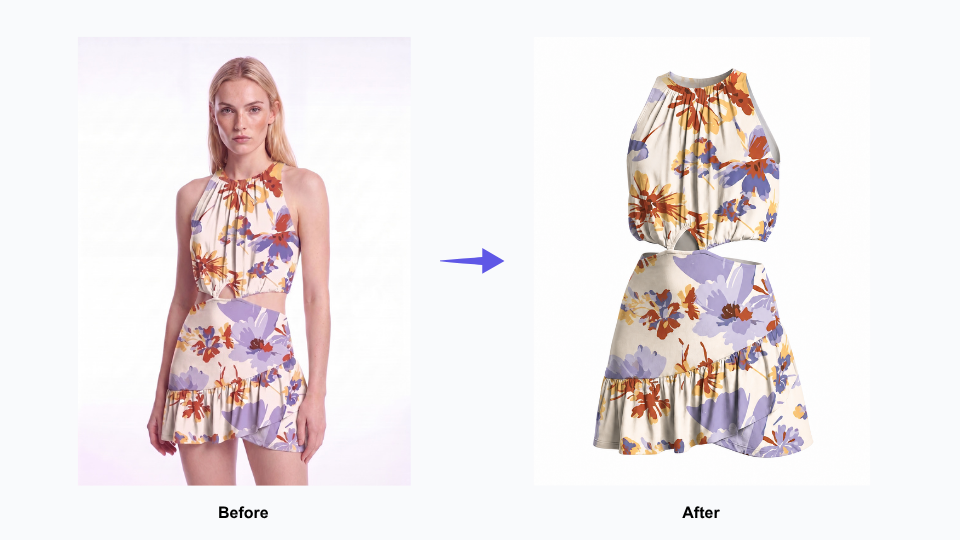
Start Generating Flat Lay From Your Existing Product Photos
Lilla P is one of a growing number of fashion brands using Fashion Diffusion AI to extend the value of photography they have already produced.
If you have a catalog of on-model or hanging product shots and need clean flat lay versions, the Flat Lay Generator derives them directly — without a second shoot.
Pair it with Change Background to adapt the same imagery for different presentation contexts, or Upscale to bring generated assets to full web-ready resolution. For a broader view of how brands are rethinking their imagery workflows with AI, the Fashion Diffusion design guide covers the wider landscape.
Try Fashion Diffusion AI free →
Some details have been presented as representative of typical use patterns and may not reflect the full scope of Lilla P’s operations. If you have questions about the content of this article or would like to clarify any information, please contact us at support@fashiondiffusion.ai.


