

Fashion brands creating fashion videos for TikTok face a specific problem: the platform rewards frequency. Posting once a week isn’t enough. The algorithm favors accounts that publish consistently — ideally daily — and the content that performs best tends to be short, visually immediate, and product-forward.
The traditional answer to this was a production team. A camera, a model, a location, a lighting setup, and an editor. That workflow costs time and money most brands don’t have available on a daily basis.
AI fashion video changes the equation. One product photo becomes a TikTok-ready video in minutes — no crew, no filming, no editing software. This guide covers exactly how to do it, and how to build a content workflow around it.
Why Fashion Brands Need More TikTok Video Content Than They Can Film
TikTok’s algorithm is built around consistency and recency. A single high-production video published once a month will consistently underperform compared to simpler content published daily. For fashion brands, this creates a real operational tension.
A standard product photoshoot produces 20–40 images and maybe one or two short video clips. Those assets get spread across a full season of content — and they run out fast. Brands that publish video content daily see meaningfully higher organic reach than those on a weekly cadence. When they do, most brands go quiet, post recycled content, or fall back on generic trending audio with static images. None of these work as well as fresh product video.
The math doesn’t favor traditional production. But it does favor AI.
What an AI Fashion Video Generator Does for Fashion Brands
An AI fashion video generator is a tool that converts a static product image into a short animated video with realistic motion — ready to publish on TikTok, Instagram Reels, or product pages without filming or editing. The garment moves, the scene is animated, and the output looks like it was filmed, not generated.
Fashion Diffusion’s AI Fashion Video tool is built specifically for this workflow. You upload an existing product image, and it generates a short video ready for TikTok, Instagram Reels, or your product pages. No camera. No crew. No editing.
The key difference from general AI video tools: garment fidelity. General video AI tools often distort fabric texture, change print patterns, or blur detail when animating. Fashion-specific tools are trained to keep those details intact — which matters for e-commerce, where the video has to accurately represent the product.
Step-by-Step: How to Create TikTok Fashion Videos with AI
Upload a product photo to Fashion Diffusion‘s AI Fashion Video tool, choose a motion style (fabric movement, camera pan, or model walk), generate a 5–15 second clip, then add hook text and trending audio in TikTok’s native editor. No crew, no filming, no editing software required.
Step 1: Choose Your Source Image
Your input determines your output quality. For TikTok, the best source images are:
- On-model shots — a model wearing the garment, ideally with a clean or simple background
- Flat-lay photos — garments laid flat with clear fabric texture and color
- Existing campaign images — repurpose photography you already have
Avoid heavily cropped images, very dark backgrounds, or shots with multiple people — the AI has less to work with and quality drops accordingly.
For a 9:16 vertical output (TikTok native format), a portrait-orientation source image gives better results than a landscape crop.
Step 2: Open Fashion Diffusion’s AI Fashion Video Tool
Navigate to AI Fashion Video and upload your image. Sign up for a free account and you’ll receive free credits to test the output quality on your specific product before committing.
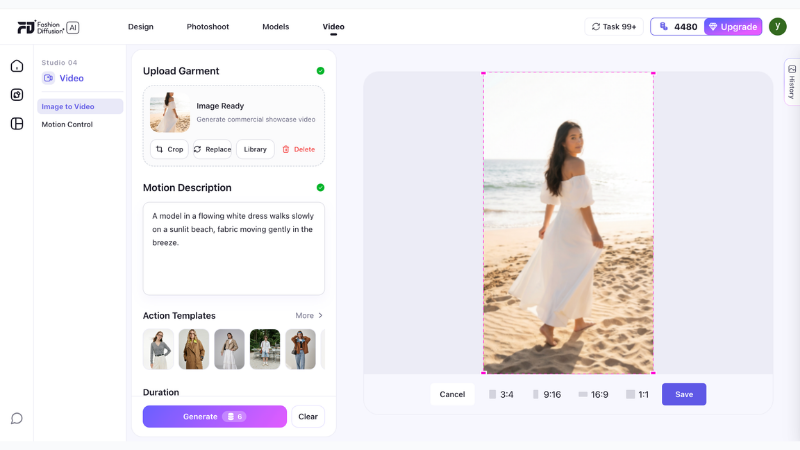
Step 3: Set Your Output Parameters
Choose the motion style and duration. For TikTok, the effective range is 5–15 seconds — long enough to show the product clearly, short enough to hold attention.
Write a prompt to describe the scene, mood, and motion you want. Be specific about the setting and movement. The more detail you give, the closer the output matches your creative direction.
Motion styles to consider:
- Fabric movement — subtle wind or body movement, fabric flows naturally. Works best for dresses, lightweight tops, and flowing garments.
- Camera pan — slow zoom or pan across the product. Works well for structured pieces like jackets and tailored separates.
- Model walk — the model moves through the scene. Strong for full-look shots and outfit reveals.
Pick one motion style per video. Mixing motion types in a 10-second clip tends to feel rushed.
Step 4: Generate and Review
The AI produces your video clip in seconds. Watch it through once and check:
- Does the fabric texture look accurate — no warping or distortion?
- Is the color consistent with your source image?
- Does the motion feel natural, not mechanical?
If anything looks off, adjust the motion parameters and regenerate. Iteration is instant.
Step 5: Add Your Hook and Audio in TikTok
AI fashion video gives you the visual. TikTok’s native editor adds the rest:
- Hook text — overlay text in the first 2 seconds. The hook is what stops the scroll. Make it specific: “This dress sold out in 48 hours” performs better than “New arrival.” Tell people something they need to know.
- Audio — use trending audio that fits the visual mood. TikTok’s algorithm surfaces content with trending sounds more aggressively. Check the Sounds tab for trending audio in your category.
- Captions — TikTok auto-generates captions from any voiceover. Add a voiceover describing the product (fabric, fit, occasion) and let TikTok caption it. This improves accessibility and boosts discoverability.
Below are examples of TikTok videos created with our AI fashion video tool:
5 TikTok Fashion Video Formats That Drive Engagement
The AI video handles the product visual. What you do with it determines performance. These are the five formats that consistently drive engagement for fashion brands on TikTok.
Outfit Reveal
Start with a flat-lay or packshot, then cut to the AI-generated on-model video. The format creates a before/after moment that naturally drives replays and saves.
Length: 8–12 seconds. Hook: “Wait until you see this on” / “The flat lay doesn’t do it justice.”
New Drop Announcement
A 6–10 second AI fashion video of a new product, with hook text announcing the drop date or availability. Simple, high-frequency, effective for building anticipation.
Length: 6–10 seconds. Hook: Drop date + “only X left” or “launching [day].”
Colorway Series
Generate the same garment in multiple colorways using Recolor, then animate each version as an AI fashion video. Cut them together as a fast-paced colorway reveal. One product, one shoot day, multiple pieces of content.
Length: 10–15 seconds. Hook: “Which colorway are you?” or show all colorways with a “pick yours” text overlay.
Behind-the-Brief
Show your AI-generated design concept next to the finished product. Brands that show their process consistently outperform those that only show finished looks — TikTok’s audience has developed strong filters for promotional content.
Length: 15–30 seconds. Hook: “This started as an AI sketch.”
Trend Styling
Take an existing product video and restyle it around a TikTok trend — a specific aesthetic, occasion, or cultural moment. Use Change Background to adapt the setting, then animate with AI Fashion Video.
Length: 8–15 seconds. Hook: Reference the trend directly in the first frame.
Building a High-Volume TikTok Content Workflow
The value of AI fashion video isn’t producing one video — it’s producing enough to post consistently without a production team.
Here’s a weekly workflow for a brand posting 5 days per week:
| Day | Content Type | Source | Tool |
| Monday | New drop announcement | Product photo | AI Fashion Video |
| Tuesday | Colorway reveal | Same product, recolored | Recolor → AI Fashion Video |
| Wednesday | Outfit on model | Flat-lay → model shot | Virtual Try-On → AI Fashion Video |
| Thursday | Background variant | Monday’s video base | Change Background → AI Fashion Video |
| Friday | Behind-the-brief | Sketch or concept image | Sketch to Render → AI Fashion Video |
Every piece of content starts from a single product photo. The AI handles the variations — model, color, background, motion. The brand handles the hook text and audio selection.
This workflow produces 20+ pieces of unique content per month from what might be 4–5 source images. Traditional production can’t match that economics at the same quality level.
TikTok Video Specs for AI Fashion Content
Get these right before publishing your AI fashion videos. Wrong specs reduce quality and can hurt distribution.
| Spec | Recommended |
| Aspect ratio | 9:16 (vertical) |
| Resolution | 1080 × 1920px minimum |
| Duration | 5–30 seconds for discovery content |
| File format | MP4 |
| Hook text position | Upper third of frame, first 2 seconds |
| Product visible | By second 1 — don’t bury the lead |
TikTok’s algorithm penalizes low-resolution uploads. Make sure your AI video output is at full resolution before uploading. Fashion Diffusion outputs at production-ready resolution by default.
What Makes a Good AI Fashion Video Generator for E-Commerce
Not all AI video tools produce usable fashion content. The distinction matters for fashion brands and e-commerce sellers:
- Garment accuracy: Does the fabric texture remain consistent through the motion? Does a floral print stay a floral print, or does it blur and shift? Fashion-specific AI tools handle this. General video tools often don’t.
- Motion appropriateness: A chiffon dress needs different motion treatment than a structured leather jacket. Fashion-trained AI understands these distinctions. Generic AI applies the same motion parameters regardless of material.
- Output for e-commerce: The video needs to accurately represent the product — not just look good. A beautiful AI video that misrepresents the fabric color or garment silhouette creates returns and erodes trust.
Fashion Diffusion’s AI Fashion Video is built for fashion e-commerce, not general video production. The difference is visible in the output.
Create TikTok Fashion Videos with AI
Most fashion brands already have the raw material — product photos, campaign images, flat-lays. The gap isn’t content ideas or creative direction. It’s production capacity. AI fashion video closes that gap: one image becomes multiple formats, every product in your catalog becomes publishable video, and your TikTok presence stops being limited by how often you can book a shoot.Start with one product photo. See what it becomes.
FAQs
An AI fashion video generator takes a static image — a product photo, flat-lay, or model shot — and produces a short animated video with realistic motion. For fashion brands, this means turning existing product photography into TikTok and Instagram Reels content without filming new footage.
For discovery content (reaching new audiences), 5–15 seconds consistently performs best. Longer videos (15–30 seconds) work for formats where storytelling is the point — behind-the-scenes, process content, or tutorial-style posts. Hook text in the first 2 seconds is critical regardless of length.
No. AI fashion video tools like Fashion Diffusion’s AI Fashion Video generate video from a product photo you already have. If you have product images — flat-lays, on-model shots, or campaign photography — you have everything you need to start.
Yes, if you use a fashion-specific AI video tool. General AI video generators often distort fabric texture and shift colors during animation. Fashion Diffusion is trained on fashion imagery and designed to preserve garment details — fabric texture, print accuracy, and color — through the motion generation process.
Using Fashion Diffusion’s full toolkit: multiple motion styles from the same image, multiple colorways via Recolor, multiple background settings via Change Background, and multiple model variants via AI Model Generator. A single product image can realistically produce 8–12 unique pieces of TikTok content.
Outfit reveals, new drop announcements, and colorway series consistently perform well for fashion brands. The common thread: the product is the main character, the hook is specific (not generic), and the video is short enough to replay without friction. AI fashion video works particularly well for these formats because you can produce them in volume without a production crew.


