

Virtual try-on works. AI photography scales. But ask any head of fashion ecommerce in 2026: the hardest part isn’t generating the first image — it’s generating consistently across your entire catalog, without losing quality or breaking the bank.
Tools like WearView have helped brands solve this initial challenge of creating high-quality AI fashion imagery. But as teams grow, their needs evolve — broader creative tools beyond photography, better API integration, multi-category support for footwear and accessories, or more flexible pricing.
This guide compares the best WearView alternatives in 2026, covering features, pricing, pros and cons, and use cases — all to help you find the right fit.
What Is WearView?
WearView is an AI fashion photography platform designed for e-commerce brands to generate on-model product imagery from flat-lays, ghost mannequin shots, and packshots. Its core capability is converting garment images into on-model visuals with AI-generated models, enabling brands to create scalable fashion photography content without traditional photoshoots.
However, WearView is less suited for end-to-end product editing workflows such as catalog-ready product images, standardized white-background listing images, and high-volume SKU image variants commonly required in fashion e-commerce operations.
Why Users Are Exploring WearView Alternatives
WearView covers a solid range of AI fashion photography tools, but several recurring reasons lead brands to explore alternatives:
- No design tools. WearView focuses entirely on photography output — it does not offer sketch-to-render, recolor, fabric application, or outfit generation. Brands that need both design ideation and photography generation must use separate platforms.
- No ghost mannequin tool on the entry plan. Ghost mannequin functionality is only available from the Pro plan ($49/month) upward, which can be a barrier for smaller brands.
- Credit limits can feel tight for large catalogs. At HD resolution, the Lite plan yields roughly 25 images per month on 50 credits. High-volume sellers processing hundreds of SKUs may find the credit model restrictive.
- Limited batch processing at scale. WearView does not emphasize enterprise batch workflows or API-first integration, which matters for teams building automated pipelines.
- The pricing tiers are quite steep. The jump from $29 (Lite) to $49 (Pro) is significant, especially for features like video and ghost mannequin, which some brands may need from day one.
Best WearView Alternatives: A Brief Overview
- Fashion Diffusion — Best Overall for AI Fashion Photography
Combines AI fashion design, AI photography, and video generation in a single workflow. Built for fashion brands and designers. Starting at $12/month. - FASHN AI — Best for Virtual Try-On Quality and API Integration
Delivers some of the most accurate virtual try-on results on the market, with strong fabric-detail preservation and a developer-friendly API for custom integrations. - Botika — Best for High-Volume E-Commerce Model Photography
Converts flat-lay and mannequin photos into professional model imagery at scale, backed by a unique human retouching service for additional quality assurance. - Style3D.ai — Best for Multi-Category Try-On and Ecommerce Content
Supports virtual try-on across apparel, shoes, bags, and accessories, making it a versatile choice for marketplace sellers and multi-category ecommerce brands. - Modelia — Best for Consistent Model Identity and Catalog Production
Features Consistent Character technology that maintains the same AI model across large product catalogs, helping brands create cohesive storefront imagery.
Quick overview:
| Tool | Key Strength | Starting Price | Best For |
| Fashion Diffusion | Broadest feature set: photography + full design suite | $12/month | Brands needing design + photography in one platform |
| FASHN AI | Best-in-class virtual try-on accuracy + developer API | $19/month | E-commerce teams & developers needing API integration |
| Botika | High-quality on-model imagery with built-in retouching | $33/month (annual) | Mid-to-large brands with high SKU volume |
| Style3D.ai | Multi-category try-on + ecommerce visual content suite | $8.9/month | Ecommerce sellers needing broad product category coverage |
| Modelia | Consistent model identity across large catalogs | Free / $35/month | Scaling brands and catalog-heavy retailers |
How WearView Compares to the Top Alternatives
The table below compares feature availability across WearView and its five alternatives. “Yes” indicates the feature is available. “Limited” indicates partial functionality. “No” indicates the feature is not available.
| Feature | WearView | Fashion Diffusion | FASHN AI | Botika | Style3D.ai | Modelia |
| Virtual Try-On | Yes | Yes | Yes (flagship) | No | Yes | Yes |
| AI Model Creation | Yes | Yes | Yes | No | No | Yes |
| Product-to-Model | Yes | Yes | Yes | Yes | Yes | Yes |
| Flatlay-to-Model | Yes | Yes | Yes | Yes | Yes | Yes |
| Ghost Mannequin to Model | Yes | Yes | Yes | Yes | No | Yes |
| Consistent Models | Yes | Yes | Yes (Face Ref.) | Yes | No | Yes (Character) |
| Ghost Mannequin Effect | Yes (Pro+) | Yes | No | No | No | No |
| AI Model Swap | Yes | Yes | Yes | No | Yes | Yes |
| Pose Control | Yes | Yes | Limited | No | Yes | Yes (Repose) |
| AI Video Generation | Yes (720p/1080p) | Yes (1080p, all plans) | Yes (720p–1080p) | Yes (Pro+) | Yes | Yes |
| Background Removal | No | Yes | Yes | No | Yes | Yes |
| Image Upscaling | No | Yes (4K) | Yes (4K) | Yes (4K, Advanced) | Yes (8K) | Yes (4K) |
| Batch Processing | No | Limited | Yes | Yes | No | Yes (Basic+) |
| Output Resolution | HD / 2K / 4K | Up to 4K | Up to 4K | HD / 2K / 4K | Up to 8K | Up to 4K |
| Design Tools | No | Yes (full suite) | No | No | Yes | Limited |
| Team Collaboration | Yes (Pro: 5, Adv: 15) | No | Yes (all plans) | Yes (Advanced+) | No | Yes (Pro: unlimited) |
| API Access | No (enterprise) | No | Yes (separate) | No (enterprise) | No | Yes (Basic+) |
| Starting Price | $29/month | $12/month | $19/month | $33/month (annual) | $8.9/month | Free / $35/month |
WearView Alternative Reviews
1. Fashion Diffusion — Best Overall for AI Fashion Photography
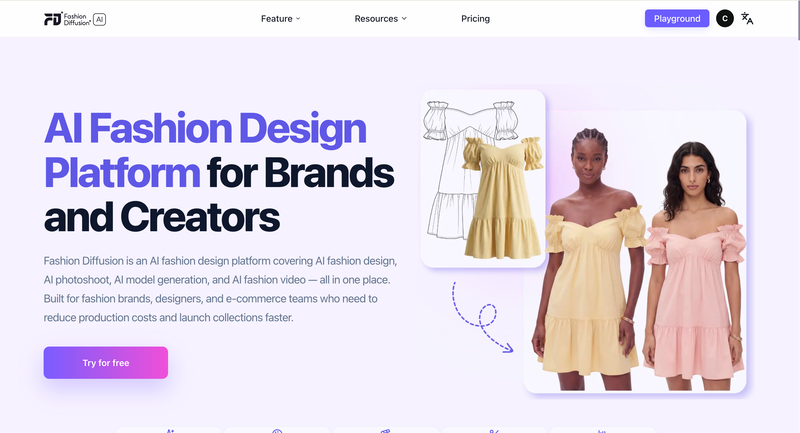
Fashion Diffusion is an AI-powered fashion design and photography platform built for fashion brands, designers, and creative teams. Unlike WearView, which focuses primarily on photography, Fashion Diffusion spans the broader creative workflow, from design ideation and sketch rendering to on-model photography and AI video. It is one of the few alternatives on this list that combines a design suite with an AI photography workflow in a single subscription.
Key Features
- Photography: Virtual try-on, on-model, flat lay, and background variations
- Model Generator: Create AI fashion models with control over appearance, body type, and poses
- Design Tools: outfit generation, sketch-to-render, restyle, recolor, and pattern design
- Video: AI Fashion Video (1080p) included on all plans
Best Use Cases
- Fashion brands and D2C labels that need design prototyping and commercial photography from a single platform.
- Designers who want to turn sketches into rendered fashion visuals and generate on-model photography without switching tools.
- Teams creating editorial and campaign content who need creative flexibility — recolor, fabric application, style exploration — alongside catalog photography.
- Agencies managing multiple fashion clients who need a wide toolset on a single subscription.
Pricing
- Starter: $12/month — 50 credits, all AI tools, 4K upscaling, AI video at 1080p.
- Creator: $29/month — 160 credits, all tools, 4K generation.
- Pro: $59/month — 380 credits, all tools.
- Studio: $199/month — 1,400 credits. Annual billing saves 2 months on all plans.
Pros
- Fashion-specific AI trained on fashion imagery — not generic image generation.
- A broad feature set combining both AI photography and design tools within a single platform.
- AI video (1080p) included on all plans, including the $12 Starter.
- 4K image generation and upscaling on all plans.
- Provides a low-cost entry point at $12/month with a relatively broad set of tools.
Cons
- No dedicated managed retouching service (human-reviewed image fixes).
- Team collaboration not prominently featured in public plan details.
2. FASHN AI — Best for Virtual Try-On Quality and API Integration
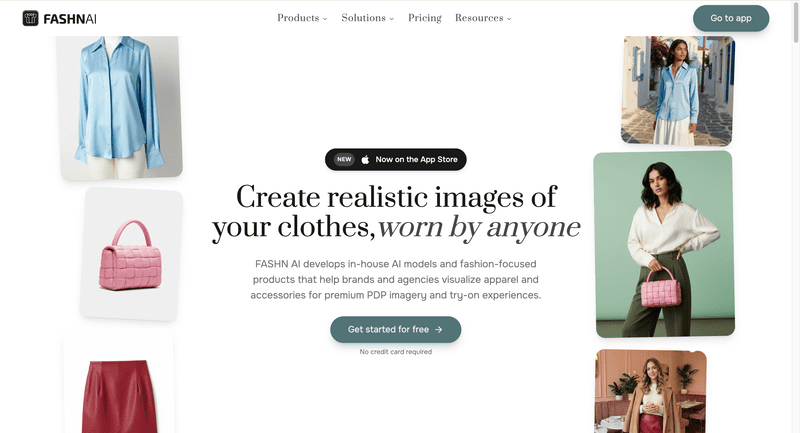
FASHN AI is an AI-first fashion platform built on best-in-class virtual try-on accuracy. Its Try-On Studio generates realistic on-model images that preserve fabric drape, garment prints, and fine textile details at up to 4K resolution. Beyond try-on, FASHN AI covers product-to-model, model creation, model swap, background removal, and AI video generation.
Among AI fashion tools, it stands out for its developer-focused infrastructure, including a full REST API and SDKs for TypeScript and Python. This allows fashion brands to embed virtual try-on and on-model photography into their existing workflows and storefronts. For a full comparison, see what we covered earlier about Fashn AI alternatives.
Key Features
- Virtual Try-On: Available for flat-lay, ghost mannequin, and on-model garment inputs.
- Product-to-Model: Transform flat product photos into realistic on-model shots with customizable model appearance, pose, and background.
- Model Creation & Consistent Identity: Generate diverse AI fashion models from prompts or reference images; Face Reference feature maintains consistent model identity across outputs.
- Model Swap: Swap models in existing photos while preserving garments, poses, and backgrounds.
- AI Video: Generate short fashion videos from static images at 720p (Basic) or 1080p (Pro+).
- API: Comprehensive REST API with documentation, SDKs, and usage dashboard for developer integration.
- iOS App: All tools accessible through a mobile chat-based interface.
Best Use Cases
- E-commerce brands that need the highest-quality virtual try-on for shopper-facing product pages.
- Development teams building fashion AI features — virtual try-on, model generation — into their own apps or platforms via API.
- Fashion brands that want to run model swap at scale to refresh existing catalog photos without new shoots.
- Teams that need organization management with shared credits across multiple users.
Pricing
- Basic: $19/month — 200 credits, all core AI tools, up to 4K, AI video 720p, 2 team members.
- Pro: $49/month — 750 credits + 50 daily credits, 1080p video, 5 team members, priority support.
- Agency: $99/month — 1,500 credits + 100 daily credits, custom face references, 10 team members.
- Agency 2×: $199/month — 3,000 credits + 200 daily credits. Annual plans: 10 months billed. Top-ups at $0.10/credit.
Pros
- Delivers high-quality virtual try-on results with strong garment detail preservation.
- Most comprehensive developer API of any tool on this list.
- Team collaboration included on all plans.
- iOS app for mobile-first workflows.
- Daily credits on Pro/Agency plans reduce month-end credit anxiety.
Cons
- No design tools.
- No ghost mannequin effect tool — WearView and Fashion Diffusion cover this.
- No free tier; the Basic plan at $19/month is the lowest entry point.
3. Botika — Best for High-Volume E-Commerce Model Photography
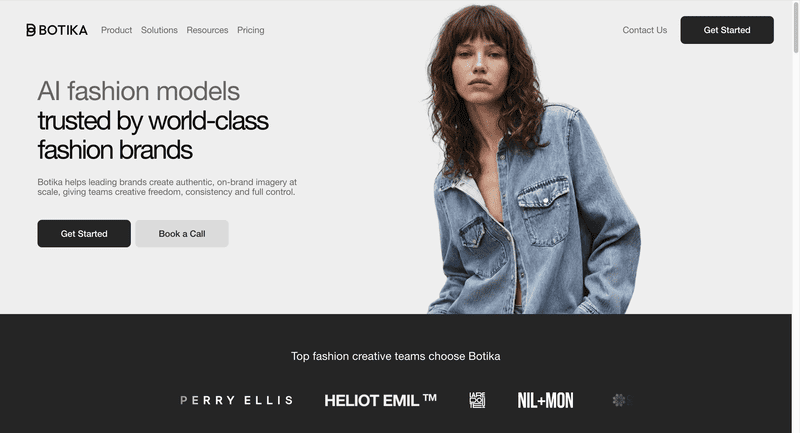
Botika is an AI fashion photography platform purpose-built for e-commerce brands that need large volumes of on-model images efficiently. Its workflow transforms flat-lay, mannequin, or product photos into professional model imagery using a diverse AI model library across ethnicities, body types, and ages.
A key differentiator is Botika’s built-in retouching service: on Pro and Advanced plans, Botika’s team will review and fix generated images that do not meet quality standards within 48 hours (Pro) or 24 hours (Advanced), at no additional cost. This quality safety net is unique among the tools reviewed here. For a full comparison, see our guide to Botika alternatives.
Key Features
- On-Model Generation: Transform flat-lay, mannequin, or packshot images into on-model photos using diverse AI models.
- Diverse Model Library: Full library of AI models across ethnicities, body types, and ages — full access on Pro and Advanced plans.
- AI Video: Generate short motion clips from model images on the Pro plan and above.
- Built-in Retouching: Human-assisted photo fixing on Pro (2 rounds, 48h) and Advanced (3 rounds, 24h) plans.
- Team Collaboration: Available on the Advanced plan.
- Shopify App: Native integration for direct catalog management.
Best Use Cases
- Mid-to-large e-commerce brands with high SKU counts that need consistent, professional model imagery at volume.
- Brands that value human-reviewed output quality and want a retouching safety net built into their plan.
- Brands focused on model diversity for inclusive product presentation.
- Shopify-native brands looking for seamless catalog integration.
Pricing (Monthly Billing)
- Lite: $22/month — Limited selection of AI models and backgrounds
- Pro: $35/month — all models, all backgrounds, 2K resolution, video
- Advanced: $230/month — 4K resolution, team collaboration, custom background colors
- Enterprise: Custom pricing
Pros
- Excellent on-model image quality with one of the widest AI model libraries.
- Unique built-in retouching service for quality assurance — not available on any other tool reviewed here.
- Unlimited credit rollover while subscribed.
Cons
- No AI design tools.
- 4K resolution only on the highest consumer plan.
- Custom model creation from text prompts not supported.
4. Style3D.ai — Best for Multi-Category Try-On and Ecommerce Visual Content
Style3D AI is an ecommerce-focused fashion photography platform built for marketplace sellers, Shopify brands, TikTok Shop teams, and solo online sellers. It stands out for its breadth of product category coverage — virtual try-on extends beyond garments to shoes, bags, and hats, making it well-suited for fashion retailers with diverse catalog needs.
The platform also includes a full image toolbox with background removal and upscaling up to 8K, plus fashion design tools for sketch-to-design, colorways, and print generation — positioning it as a broad ecommerce visual content solution rather than a photography-only tool.
Key Features
- Model Photography: Virtual Garment Try-On, Virtual Shoe Try-On, Virtual Bag Try-On, Virtual Hat Try-On, Change Model & BG, Change Pose, Model Variations, Outfit Try-On, Generate Views.
- Product Photography: Garment to Flat Lay, Flat to 3D, Garment Detail Shots, Fabric Try-On.
- Video: Image to Video (static fashion images to short product display videos), Reference to Video (smoother model videos with stable motion).
- Image Toolbox: Background Remover, Image Upscaler (up to 8K), Photo Enhancer, Garment Retouching, Object Remover, Inpainting, Expand Image.
- Fashion Design Tools: Text to Design, Sketch to Design, Extract Technical Drawing, Design Variations, Change Colors, AI Print Generator.
Best Use Cases
- Multi-category fashion ecommerce sellers managing catalogs that include garments, footwear, bags, and accessories — needing try-on imagery for all product types in one platform.
- Marketplace brands (Amazon, Shopify, TikTok Shop) needing fast, listing-ready visual content without a studio.
- Sellers wanting high-resolution output (up to 8K) at an entry-level price point.
- Brands needing basic design iteration tools — colorways, sketch visualization, print generation — alongside product photography.
Pricing
- Basic: $8.9/month (regular $12, 25% off) — 300 credits, ~300 images, generate 2 images/videos at once, rollover credits.
- Advanced: $53.9/month (regular $80, 32% off) — 2,000 credits, ~2,000 images, generate 4 images/videos at once, rollover credits, all VIP features.
Pros
- Most affordable entry point on this list at $8.9/month for 300 credits.
- Broadest product category try-on coverage: garments, shoes, bags, and hats in a single subscription.
- Image upscaling up to 8K.
- Includes fashion design tools (sketch to design, colorways, print generation).
- Rollover credits on both plans.
Cons
- No API access or team collaboration features.
- No ghost mannequin effect or consistent model identity tool.
- Batch processing limited — 2–4 images at once rather than a full bulk pipeline.
- No built-in retouching service.
5. Modelia — Best for Consistent Model Identity and Catalog Production
Modelia is an all-in-one AI fashion visual platform covering the full product imagery workflow — from flat-lay and mannequin images through to on-model photos, video, and accessory styling. Its standout capability is the Consistent Character feature, which generates the same AI model across multiple garments, poses, and backgrounds for a unified catalog aesthetic.
API access and batch generation are available from the Basic plan, making it practical for scaling brands building automated content pipelines. A free Starter plan includes access to all tools, making it the lowest-risk option to test with real products.
Key Features
- Flatlay-to-Model, Mannequin-to-Model, Model-to-Model: Full conversion workflow from any garment source to on-model imagery.
- Virtual Try-On: Apply garments to specific model photos with realistic fit rendering.
- Consistent Character: Generate and reuse the same AI model identity across entire catalogs — up to 1 (Project), 3 (Basic), 6 (Pro), or unlimited (Business).
- Repose: Change model poses in existing photos.
- Outfit Generator & Smart Styler: Create full outfit combinations with AI accessory styling.
- AI Video Generator: Create 5-second or 10-second fashion videos from static images.
- Batch Generation & API Access: Available from the Basic plan for workflow automation.
- Upscaler: Up to 4K image exports on all paid plans.
Best Use Cases
- Scaling e-commerce brands that need consistent model identity across large product catalogs.
- Retailers managing seasonal collections who want to build a signature AI model and use it across hundreds of images.
- Teams that need batch processing and API access without enterprise-level pricing.
- Brands looking for a free entry point to test AI fashion photography before committing to a paid plan.
Pricing
- Starter: Free — 20 credits/month, all tools, watermarked, non-commercial.
- Project: $12 one-time — 50 credits, commercial rights, 4K exports, 1 consistent character.
- Basic: $35/month — 250 credits, rollover, commercial rights, 3 consistent characters, batch, API, 4K.
- Pro: $85/month — 750 credits, 6 consistent characters, unlimited team seats, API.
- Business: $300/month — 3,000 credits, unlimited consistent characters. Annual billing saves 20%.
Pros
- Maintains consistent model appearance across multiple outputs.
- Free tier with access to all tools — lowest barrier to entry.
- API and batch generation from the $35/month plan.
- Broad feature coverage: photography, video, pose control, accessory styling.
- Unlimited team seats on the Pro plan.
Cons
- Free tier images include watermarks and are non-commercial — paid plan required for brand use.
- No design tools (sketch-to-render, recolor, outfit generation from text).
- No ghost mannequin effect.
- Video generation is credit-intensive (25 credits for a 5-second video).
Which Fashion AI Tools Should You Use?
For Fashion Brands That Need Design and Photography in One Platform
Choose Fashion Diffusion if you want to go from concept creation to production-ready visuals in a single workflow. It combines AI fashion design, AI photography, and video generation in one platform.
For Ecommerce Teams Focused on Virtual Try-On
Choose FASHN AI or Fashion Diffusion for realistic virtual try-on results, or Style3D.ai if you need virtual try-on across apparel, footwear, bags, and accessories.
For High-Volume Product Image Production
Choose Botika if your priority is generating large volumes of professional on-model images with an added layer of human quality assurance.
For Brands Building a Consistent AI Model Identity
Choose Modelia if you want the same AI model to appear consistently across an entire catalog, campaign, or seasonal collection.
The Future of WearView Alternatives in Fashion
AI fashion visuals are evolving toward higher realism, multi-category try-on, and video-first content, with AR and real-time personalization emerging as the next frontier.
Reuters reports that online fashion retailers such as Zalando are already using AI-generated product imagery and virtual try-on to improve efficiency, reduce costs, and increase conversion through more accurate sizing.
For brands navigating this shift, the right solution depends on catalog size and creative needs. Fashion Diffusion is one such option, combining fashion photography, a creative design suite, and AI video generation.
Try the free trial →
FAQ
Fashion Diffusion serves as a versatile alternative to WearView, combining AI fashion photography with a design suite starting at $12/month. For teams prioritizing specific needs, FASHN AI focuses on virtual try-on accuracy, while Modelia is often used for scalable and consistent AI model generation.
Fashion Diffusion is a strong fit for teams that want an integrated workflow for both design and AI photography. Compared to WearView’s focus on AI on-model imagery, it expands into design tools and features like ghost mannequin and pose control for more complete fashion content creation.
No. WearView is a photography-only platform and does not include fashion design capabilities. Fashion Diffusion combines both design and photography. Its design tools cover concept development such as sketch-to-render and AI outfit generation. It also includes material editing tools like fabric application and recoloring, as well as print-focused features such as seamless pattern creation and pattern extraction.
No. WearView is not fully free. It offers a 10-credit trial after sign-up, but there is no permanent free plan. For users looking for ongoing free access, Modelia provides a Starter plan with 20 monthly credits, though outputs are watermarked and limited to non-commercial use. Fashion Diffusion and FASHN AI also includes complimentary credits for new users.
Style3D AI offers the lowest entry at $8.9/month. Fashion Diffusion at $12/month delivers better value if you need design tools alongside photography. Modelia offers a permanently free Starter plan for non-commercial testing.


