

AI is reshaping fashion design at unprecedented speed, with sketch generators becoming indispensable for creators in 2026. Traditional sketching’s tedious hours, skill barriers, and limited iterations are a thing of the past. Today’s AI sketch generator transforms text prompts or reference images into polished sketches in minutes, freeing designers to focus on creativity over repetition.
These tools don’t replace human artistry; they enhance it. Solutions like Fashion Diffusion, built specifically for fashion’s unique needs, streamline concept-to-render workflows with intuitive features tailored to designers, brands, and students.
Below is a breakdown of how these AI fashion design tools work, real brand success stories, top tool recommendations, and tips to keep AI outputs aligned with your brand aesthetic. Dive into 2026’s design revolution—where speed meets creativity.
What Is an AI Sketch Generator
An AI sketch generator is an AI-driven tool harnessing neural networks and deep learning to swiftly craft sketches, line drawings, or hand-drawn-style illustrations from user inputs like text descriptions or reference pictures, without requiring professional drawing skills.
Unlike manual sketching, an AI sketch generator turns abstract ideas into visual sketches in seconds, mimicking human styles to ensure consistent quality and customization for users of all levels.
Its core value is in democratizing creativity, saving time/costs, and providing versatility. It lets untrained users create high-quality sketches instantly, slashes manual work time, cuts illustrator/art supply costs, and offers diverse styles for needs like character design or social media. For pros, it breaks creative barriers and streamlines workflows as a rapid prototyping tool.
Although these benefits make AI sketch generators highly useful, their ability to produce natural and polished results depends on sophisticated underlying technology. To better understand how they turn simple inputs into refined sketches, let’s delve into how AI sketch generators work.
How an AI Sketch Generator Works
The AI sketch generator turns creative ideas into structured sketches via a streamlined 4-step workflow, using deep learning to ensure speed and alignment with user intent. Here’s a concise breakdown:
1. Input Handling & Intent Understanding
The AI parses user input to grasp creative needs. For text prompts (e.g., “minimalist blouse sketch”), it uses multimodal models to identify key design elements and style. For rough drafts or reference images, it extracts core shapes and edges. User controls (bounding boxes, masks) add precision for design-specific adjustments.
2. Latent Embedding & Creative Planning
The parsed input is converted into a latent embedding, a numerical format that the AI can process. A transformer or LLM then plans stroke order (mimicking human designers, e.g., outlining a silhouette first, then details) to ensure coherent proportions and flow.
3. Sketch Generation (Denoising & Stroke Formation)
Most generators use diffusion models: starting with random noise, they iteratively denoise it into a sketch, guided by the latent embedding. Raster sketches become distinct lines, while vector sketches (ideal for fashion) turn into smooth, scalable Bézier curves. The process is fast, enabling rapid design iterations.
4. Refinement & Output
The AI polishes the sketch by smoothing jagged lines, correcting proportions, and removing redundant marks. It then outputs the final sketch in common formats and supports further edits via new prompts or controls, fitting practical design needs.
AI Sketch Generator vs Traditional Sketching

Today’s fashion industry is seeing a quiet but impactful shift in how designs begin. Traditional fashion design starts with a designer’s inspiration, which they then sketch by hand, a process that requires strong drawing skills, careful attention to detail, and plenty of time.
But with the rise of AI, fashion design tools are changing this: designers simply input a text description of their vision, and the AI sketch generator instantly outputs multiple clothing sketch styles, speeding up the initial ideation process.
AI offers speed, efficiency, and endless possibilities, letting designers iterate quickly without needing strong hand-drawing skills. Traditional sketching, on the other hand, brings craftsmanship, emotion, and unique, irreplaceable strokes, each line reflecting the designer’s personal technique and creativity. A detailed comparison table below outlines the strengths, weaknesses, and ideal use cases of both approaches.
Comparison Table
| Criteria | AI Sketch Generator | Traditional Sketching |
| Speed | Instant. Generates high-quality sketches in seconds or minutes. | Time-Consuming. Requires hours, days, or even weeks to complete a detailed piece. |
| Skill Requirement | Low. No drawing skills needed. Requires proficiency in writing effective prompts. | High. Demands mastery of perspective, shading, composition, and hand-eye coordination. |
| Creative Control | Indirect. You guide the AI through text; results can be unpredictable. | Absolute. Every line, stroke, and detail is directly controlled by the artist’s hand. |
| Originality & Style | Derivative. Mimics styles based on training data; risk of generic results or accidental plagiarism. | Unique. Style is a direct reflection of the artist’s personal technique and emotional expression. |
| Iteration | Unlimited. Generate dozens of variations instantly to explore different concepts. | Limited. Redrawing or modifying requires starting over or physically altering the artwork. |
| Emotional Connection | Result-Oriented. The focus is on the final image; the process feels more technical. | Process-Oriented. The act of drawing is meditative and expressive; imperfections add character. |
| Tools | Digital. Requires a device and internet. | Physical. Requires paper, pencils, erasers, etc. |
| Cost | Subscription fees may apply for premium tools. | Costs accumulate with material consumption. |
| Best Use Cases | Concept art, fashion design ideation, storyboarding, generating references, exploring new styles. | Fine art, life drawing, building foundational skills, detailed illustrations, personal journals. |
The comparison highlights a clear contrast: An AI sketch generator excels in speed, iteration, and accessibility, while traditional sketching offers unmatched creative control, originality, and emotional depth. For many fashion professionals, the choice is no longer between one or the other, but how to integrate both into a more efficient and versatile design workflow.
Why Fashion Designers Are Switching to AI Sketch Generator in 2026
Against this backdrop of evolving tools and shifting workflows, it is becoming increasingly clear why AI is emerging as a dominant force in fashion design.
The advantages of AI sketch generators—speed, scalability, and the ability to explore hundreds of ideas in minutes—are reshaping how designers approach their creative process. As the industry moves into 2026, more fashion creators are turning to AI not just as a convenience, but as a fundamental part of their design toolkit.
Key Use Cases: AI Sketch Generator in Fashion Design
AI is transforming the design workflow by enabling creators to manipulate visual elements with unprecedented precision. Beyond just generating images, these tools are being used to solve specific, high-stakes design challenges:
- Rapid Silhouette Iteration: Designers can instantly test how a garment’s structure changes when modified—expanding a shoulder, cinching a waist, or altering the length. It allows for the rapid refinement of the core shape before any fabric is cut.
- Fabric and Texture Experimentation: AI excels at rendering complex textures. Designers use it to overlay different materials onto a base sketch to see which combination creates the most striking visual impact.
- Cohesive Collection Visualization: Maintaining a consistent theme across an entire collection is simplified. By using a consistent seed image or prompt style, designers can ensure that 20 different looks feel like they belong to the same story.
To see these use cases in action, below are real-world examples of how leading fashion brands leveraged those AI sketch generators to bring creative visions to life.
G-Star Raw x MidJourney
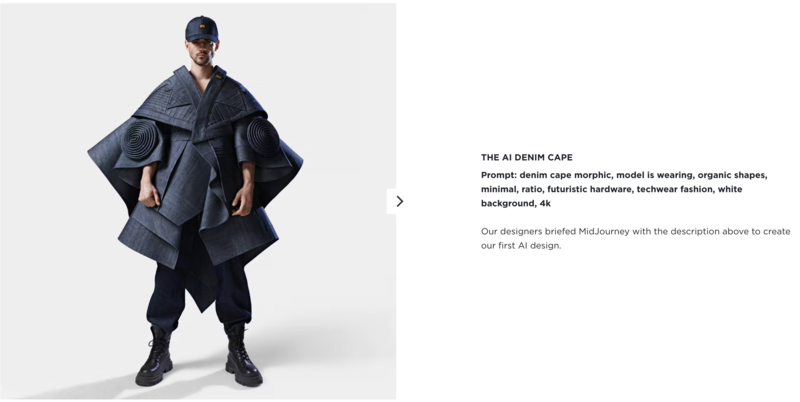
Dutch denim brand G-Star Raw harnessed the power of MidJourney to develop an avant-garde denim collection, inputting prompts focused on sculptural silhouettes and futuristic denim details.
The tool generated 12 distinct sketch concepts, from structured jackets to innovative boots, in just a few days. It is a process that traditionally would have taken weeks of hand-drawing and brainstorming. Designers selected one concept for full production, streamlining the initial ideation phase and accelerating time-to-market for the new line.
Kate Spade New York x Adobe Firefly
Tapestry, the parent company of Kate Spade New York, integrated Adobe Firefly Customised Models into its design workflow to scale creativity while preserving the brand’s iconic, playful, and polished aesthetic. The team trained Firefly on Kate Spade’s archival patterns, textures, and silhouettes, allowing designers to generate on-brand sketch concepts in minutes rather than weeks.
Handbag and accessories designer Gurashish Kaur noted that Firefly’s realistic renderings made collaboration with product development and marketing teams faster, eliminating lengthy back-and-forth over hand-drawn sketches and reducing revision cycles.

Mango x Mango Stylist
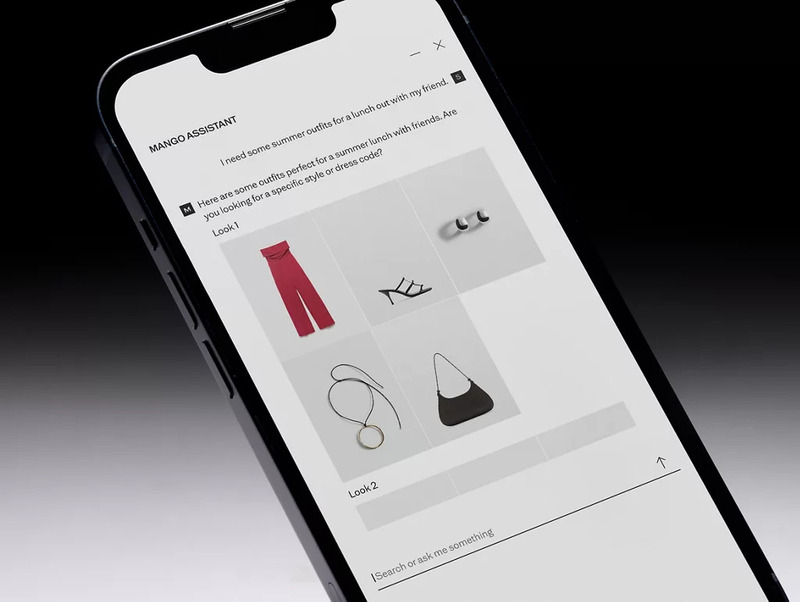
In July 2025, Mango launched Mango Stylist, an AI-powered virtual fashion assistant integrated into its e-commerce platform and Instagram. Beyond delivering personalized outfit recommendations via natural conversation, the tool’s user preference data (e.g., favored silhouettes, fabric textures, or print styles) directly informs the brand’s design team, guiding AI sketch iterations for future collections.
This aligns with Mango’s broader AI strategy, complementing its 15+ machine learning tools to bridge consumer insights with rapid sketch ideation across nine key markets.
Revolve x MidJourney/Stable Diffusion
American e-retailer Revolve experimented with AI sketch generators during New York’s first AI Fashion Week, using MidJourney and Stable Diffusion to create initial sketches for potential new designs. The brand generated dozens of sketch variations for trend-driven pieces, then tested customer response to the AI-created concepts online.
Only the sketches that resonated with consumers were selected for full production, minimizing overproduction risk and ensuring the final line aligned with customer demand. This approach reduced waste and improved efficiency, as Revolve avoided investing resources in designs with little market interest.
H&M Studio x Digital Twins
H&M Studio is exploring emerging technologies like generative AI to amplify creativity and reimagine how we showcase fashion. The technology offers an opportunity to enhance storytelling and find new ways to connect with our customers, while staying true to H&M Studio’s style-led, human-centric identity. We remain committed to empowering self-expression and liberating fashion for the many.
By leveraging AI to generate initial design sketches, the design team can rapidly explore a multitude of creative directions and refine silhouettes at an unprecedented pace. It allows the studio to minimize waste by testing concepts virtually before physical production.

Best AI Sketch Generator for Fashion
To find the best fit for your fashion design workflow, the top 10 AI sketch generators online tailored to the industry are curated below. Each tool offers unique features to meet different needs, from beginner-friendly interfaces to production-ready outputs and seamless integration with 3D prototyping or collaborative workflows.
AI-Powered Sketch Generators (Ideal for Concept Ideation)
- Fashion Diffusion: An AI platform for designers/brands, with core features like Image to Sketch, Text to Sketch, and Sketch to Render, speeding up concept development with high-quality visuals.
- Style3D AI: A 3D visualization tool that converts flat sketches to 3D, simulates fabric movement, and bridges concept and production stages.
- OpenArt: A beginner-friendly AI platform for creative exploration, generating sketches from text prompts and aiding mood board creation for early-stage ideation.
Professional Vector Tools (Ideal for Technical Precision)
- Adobe Illustrator: A subscription-based classic for precise vector flats, technical drawings, and production-ready visuals.
- Affinity Designer: A one-time purchase alternative to Illustrator, offering professional vector sketching and flats with a lighter, easier-to-learn interface.
Digital Hand-Drawing Tools (Ideal for Natural, Freehand Sketches)
- Sketchbook: Intuitive freehand tool with diverse brushes and layers, perfect for natural, loose, early-concept sketches.
- MediBang Paint: A free, lightweight tool for quick, detailed sketches, with cloud storage and simple controls, great for students and independent designers.
Template & Presentation Tools (Ideal for Fast, Structured Workflows)
- Canva: User-friendly platform for mood boards and concept presentations (drag-and-drop, no design background needed—not for detailed sketches).
- Repsketch: A fashion-specific tool with industry-standard templates, streamlining professional sketch creation and maintaining proportion consistency.
- Pret-a-Template: Low-learning-curve tool with ready-made body/garment templates, speeding up early concept planning and consistent design exploration.
Benefits of Using Fashion Diffusion for Fashion Designers
Among the AI-powered tools supporting fashion sketching workflows, Fashion Diffusion focuses on addressing common pain points throughout the design process.
Designed to reduce tedious manual work while maintaining a practical level of precision, its core features work together to streamline creative and operational efficiency, serving as a useful tool for designers, students, and brands.
Text-to-Sketch
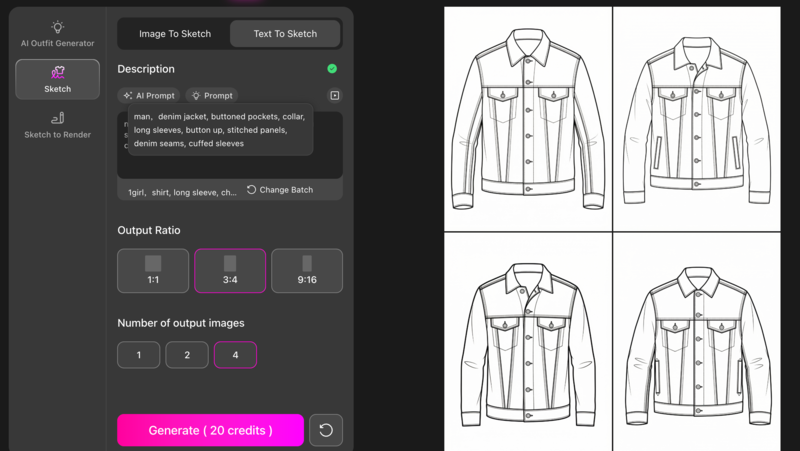
Many designers struggle to translate verbal concepts into initial sketches, and this is where the AI sketch generator from text adds practical value. To use it, simply input a clear design description (e.g., “asymmetrical off-shoulder dress with ruffled hem” or “oversized denim jacket with cargo pockets”) into the tool. The AI processes the text and generates stylistically consistent sketches that capture core design details, even for users with no advanced drawing experience.
When you are stuck for ideas on what to write, you can also use the AI prompts provided by the tool to generate text content.
Key advantages:
- Turns abstract ideas into tangible visuals in a short time.
- Enables quick exploration of multiple design directions.
- Helps design students bridge the idea-to-sketch gap before moving to manual drafting.
- Provides usable silhouettes for early concepts.
Image-to-Sketch
Fashion inspiration often starts with visuals—fabric swatches, street style photos, vintage garment shots, or fabric drape images. Translating these references into clean line drawings traditionally requires hours of manual tracing, but Image to Sketch simplifies the process: upload any reference image, and the AI automatically extracts key design elements to generate customizable line drawings.
No complex editing skills are needed, and the output serves as a ready-to-refine foundation for further tweaks.

Key advantages:
- Cuts down on repetitive tracing work, saving time for students and textile designers alike.
- Maintains garment structure and detail accuracy, with clean outlines that minimize rework.
- Works seamlessly with simple geometrics and basic prints.
- Eliminates the need to start technical drawings from scratch.
Sketch-to-Render
After completing sketch creation, whether via Image to Sketch, Text to Sketch, or manual drafting, Fashion Diffusion offers a seamless next step: transforming those rough line drawings into production-ready, presentation-worthy visuals with Sketch to Render.
Rough sketches often fail to convey fabric texture, color, or depth, which can hinder communication with clients or production teams. This tool solves that by adding customizable colors, fabric details, and subtle shadows to bring designs to life.
The workflow is intuitive: upload a finished sketch, enter desired fabric properties and color palettes, and the AI elevates the draft into a high-fidelity render. This completes the design cycle, taking a concept from an initial reference or text idea, through structured sketching, to a polished visual ready for real-world use.

Key advantages:
- Creates intuitive, lifelike visuals that help clients better understand design proposals.
- Reduces sampling costs by enabling buyer approvals before physical samples are produced.
- Streamlines the transition from concept sketch to production-ready or presentation-worthy visualization.
AI Outfit Generator
The AI Outfit Generator simplifies crafting effective design prompts, ensuring users get precise visual results. For those unsure how to phrase ideas, the tool suggests detailed, fashion-specific prompts. Alternatively, upload an existing image (mood board snippet, garment photo, reference sketch), and the AI reverse-engineers a precise prompt that captures the image’s style, silhouette, and details.
How to Ensure AI-Generated Sketches Match the Brand’s Aesthetic
Maintaining brand consistency is crucial for fashion labels. AI sketch generators, while powerful, can produce generic results if not guided strategically. Below is a streamlined framework to align AI outputs with your brand’s unique aesthetic, ensuring every sketch feels authentic.
1. Define Your Brand Aesthetic Blueprint
First, codify your brand’s visual DNA into an actionable blueprint to guide the AI:
- Core Visual Elements: Document signature silhouettes (e.g., “oversized fits,” “fitted waistlines”), brand-exclusive color palettes (primary/secondary/accent hues to prioritize/avoid), key textures (e.g., “distressed denim,” “matte organic cotton”), and recurring details (e.g., “embroidered logos,” “ruffled hems”).
- Style Vibe: Capture the emotional tone (e.g., “whimsical feminine,” “futuristic techwear”) with references from past collections to avoid vague direction.
2. Craft Brand-Specific Prompts
Vague prompts lead to generic results. So, refine your input with brand-centric details:
- Anchor with Brand Identity: Start prompts with your brand name (e.g., “Kate Spade New York-style crossbody bag”).
- Weave in Blueprint Cues: Combine silhouette, color, and texture descriptors (e.g., “[Brand Name] minimalist linen shirt, oversized fit, cream color, subtle chest pocket, matte texture”).
- Avoid Generic Terms: Replace broad words (e.g., “trendy”) with precise language (e.g., “utilitarian cargo pockets,” “brass hardware”).
3. Use Reference Images as AI Guides
Supplement prompts with visual anchors from your brand’s portfolio:
- Upload a “Seed Image”: Select a best-selling piece that embodies your aesthetic, then prompt the AI to build on it (e.g., “Generate a new [Brand Name] dress using this seed image’s silhouette, with summer lace sleeves”).
- Adjust Reference Influence: Control how closely the AI mimics the reference (e.g., 70% influence for core consistency + new details).
4. Add Human Refinement
AI sketches are a starting point. The next step is injecting brand personality with human tweaks:
- Edit in Professional Tools: Import AI outputs into Adobe Illustrator or Affinity Designer to adjust proportions, add signature details, or align colors with your exact palette.
- Incorporate Hand-Drawn Elements: Add irreplaceable brand signatures (e.g., custom logos, hand-stitched details) that AI can’t replicate.
Embrace the Future of Fashion Design with Fashion Diffusion
AI sketch generators are not just a trend. Instead, they are the new foundation of efficient, boundary-pushing fashion creation. By turning text prompts and reference images into polished sketches in seconds, streamlining iterations, and bridging concept to production, these tools free creators to focus on what truly matters: innovation, brand storytelling, and emotional resonance.
So, ready to revolutionize your design process? Try Fashion Diffusion now. Experiment with fabric textures, iterate on silhouettes, and transform rough drafts into production-ready renders—effortlessly.
The future of fashion design is fast, creative, and accessible—and it starts with your first sketch!
FAQ
Free AI sketch generators are great for early-stage concept ideation, mood boards, or student projects. However, for professional production, premium tools are more reliable: they provide higher resolution, customizable styles, and integration with industry-standard workflows. Free tools may have limitations like watermarks, limited iterations, or generic results.
No. AI sketch generators are productivity tools, not replacements for designers. They handle repetitive tasks and break creative blocks, but lack the human ability to interpret trends emotionally, inject brand storytelling, or make nuanced design decisions. The most effective workflow combines AI’s speed with designers’ creativity.
No. Most tools are designed for low technical barriers. Beginners only need to: 1) Write clear prompts; 2) Upload reference images; 3) Adjust basic settings. For advanced use (e.g., custom models, 3D integration), basic familiarity with design software (e.g., Illustrator) helps, but it’s not mandatory—many brands train teams on AI tools in 1-2 sessions.
To mitigate copyright risks: 1) Use tools trained on licensed data; 2) Avoid inputting copyrighted reference images; 3) Train custom models with your brand’s original archive; 4) Modify AI outputs significantly to ensure originality; 5) Check tool terms of service—some require attribution for commercial use.


